Prevent VPN traffic leaks with Client VPN Route Enforcement in AWS Client VPN
Unintended traffic leaks are a real risk when you rely on remote connectivity to access cloud resources, so maintaining VPN routing integrity on connected devices is essential. When a device connects through a VPN, the administrator-defined routes instruct the operating system to direct specific traffic through the encrypted tunnel. However, those routes can be altered after the connection is established through DHCP-based route injection (such as the TunnelVision technique, CVE-2024-3661), rogue network configurations, or local software changes. This type of route manipulation can redirect corporate traffic to attacker-controlled gateways without the user or administrator knowing. As a result, VPN-destined traffic flows unencrypted outside the tunnel, where it can be intercepted. You can now maintain routing integrity with Client Route Enforcement, a feature of AWS Client VPN that continuously monitors the routing table on connected devices and corrects modifications that conflict with the tunnel configuration. If a local change attempts to divert traffic away from the tunnel, Client Route Enforcement removes the conflicting route and restores deleted VPN routes.
This post walks you through how Client Route Enforcement works, the steps to activate it on your Client VPN endpoint, and best practices for integrating it into your remote access architecture.
Overview of Client Route Enforcement
When a user establishes a VPN connection, Client VPN pushes a set of routes to the client device. These routes determine which destination CIDR blocks are allowed through the encrypted tunnel. In a full-tunnel configuration, a default route (0.0.0.0/0 or ::/0) directs traffic through the VPN. In a split-tunnel configuration, only specific CIDRs route through the tunnel while the remaining traffic uses the local internet path.
Without Client Route Enforcement, you cannot detect or prevent route modifications on connected devices. External factors such as DHCP option 121 injection can alter routes from a rogue network (as demonstrated by the TunnelVision technique, CVE-2024-3661), local software changes, or manual reconfiguration. This type of route manipulation can redirect corporate traffic to attacker-controlled gateways without the user or administrator knowing, causing VPN-destined traffic to flow unencrypted outside the tunnel where it can be intercepted. Administrators have limited visibility into these changes and no remote mechanism to correct them.With Client Route Enforcement, the AWS-provided VPN client software continuously monitors the device routing table. If a route that conflicts with the VPN tunnel configuration appears, the client software removes the conflicting route. If a VPN route has been deleted, Client Route Enforcement restores it. This enforcement applies to both IPv4 and IPv6 address families.
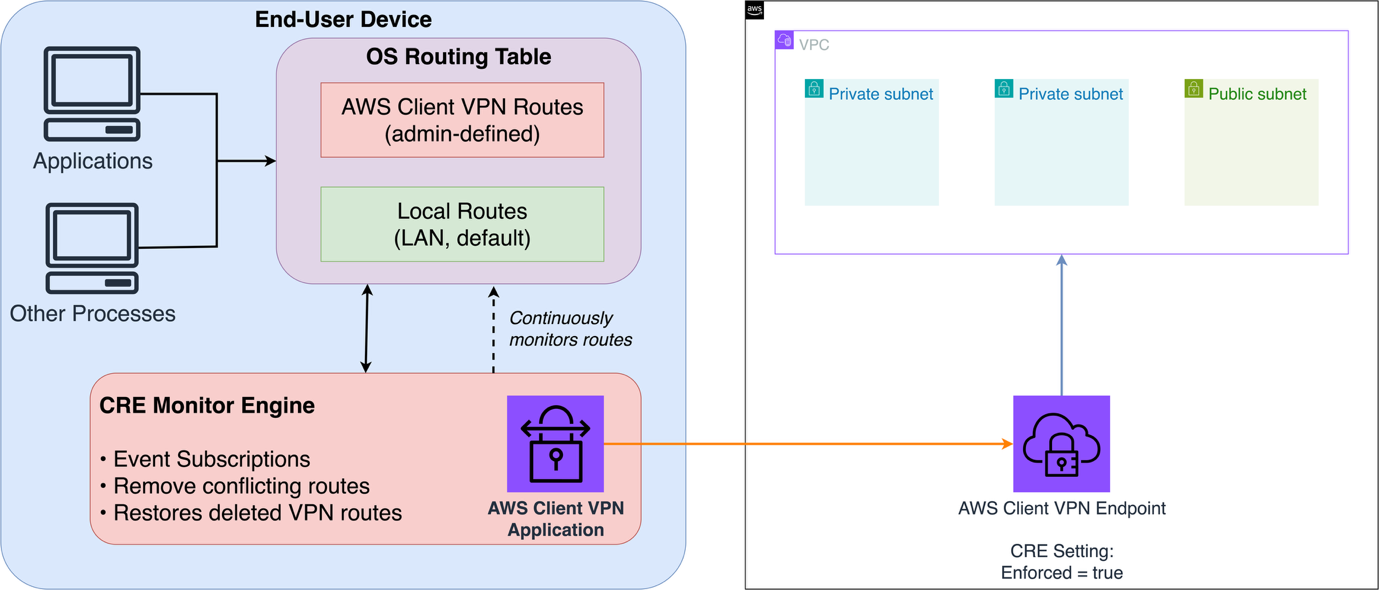
Figure 1: Client Route Enforcement (CRE) architecture overview
- AWS Client VPN Endpoint – The server-side resource deployed in your AWS account. It holds the VPN configuration, including the route table, authorization rules, and the Client Route Enforcement setting.
- AWS VPN Client application – Runs on the user’s device (Windows, macOS, or Ubuntu). This application establishes the OpenVPN TLS tunnel and, when Client Route Enforcement is active, monitors and enforces the local routing table.
- VPC route infrastructure – Traffic that enters the VPN endpoint routes according to the Amazon Virtual Private Cloud (Amazon VPC) route table, security groups, and network access control lists (ACLs). From there, it can reach other subnets, peered VPCs, or on-premises networks.
- Authentication and authorization layer – Authorization rules control which CIDRs a user can access. Client Route Enforcement verifies that the user’s traffic for those CIDRs traverses the tunnel. Both are needed for a complete security posture.
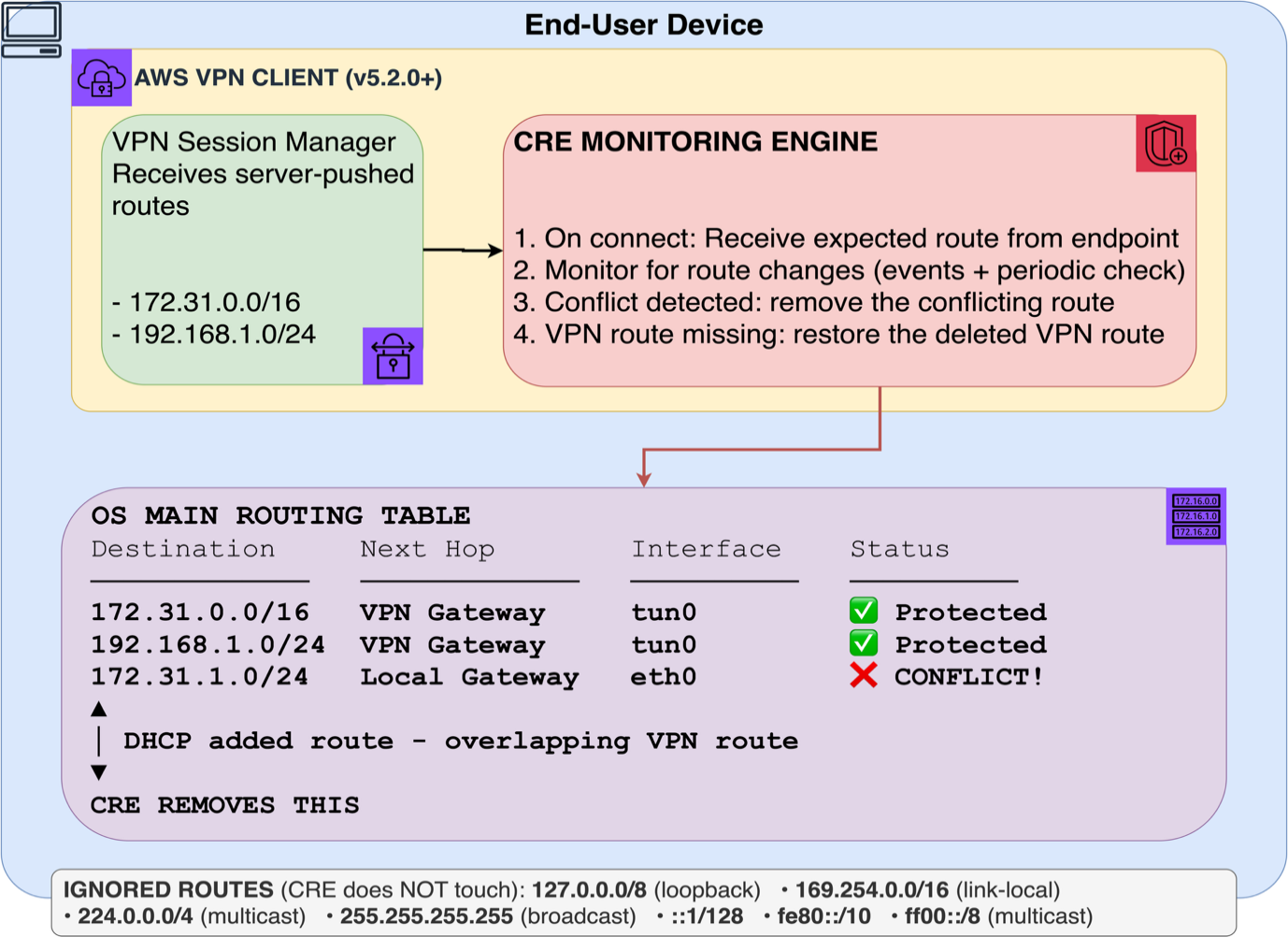
Figure 2: CRE Montoring Engine
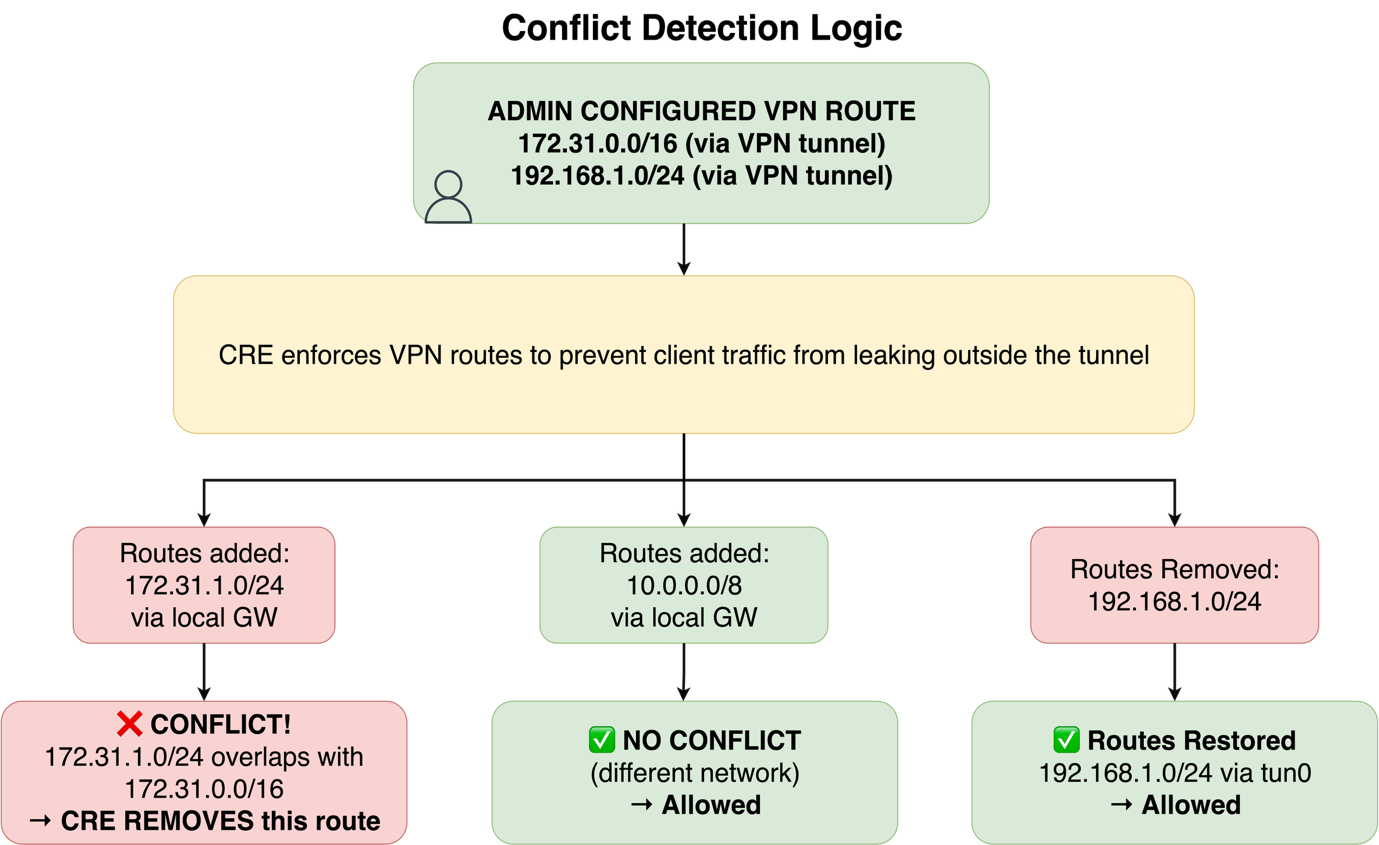
Figure 3: CRE conflict detection logic
How Client Route Enforcement works
Client Route Enforcement operates through cooperation between the Client VPN endpoint and the AWS-provided VPN client application. The enforcement lifecycle works as follows.
- The administrator activates Client Route Enforcement on the Client VPN endpoint through the Amazon VPC console, the AWS Command Line Interface (AWS CLI), or the Amazon EC2 API.
- The user connects to the endpoint using the AWS-provided VPN client. The endpoint pushes the configured routes and the enforcement flag to the device.
- Route installation and protection – The VPN client installs the pushed routes into the device operating system routing table and records them as protected entries. If conflicting routes already exist at connection time, the client removes them to direct traffic into the tunnel.
- Ongoing monitoring – The VPN client continuously monitors the device routing table for changes through event subscriptions and periodic checks, preventing route-based issues such as DHCP option 121 injection from diverting traffic outside the tunnel. If a user or process attempts to modify a protected route, the client removes the conflicting route or restores a deleted VPN route.
- Session end – When you disconnect, the VPN client removes the VPN routes and deactivates route protection, restoring the device routing table to its pre-connection state.
This process operates without user interaction. Client Route Enforcement works with both split-tunnel and full-tunnel configurations, and it supports IPv4-only, IPv6-only, and dual-stack endpoints. For dual-stack endpoints, Client Route Enforcement applies to both stacks simultaneously and cannot be activated for one stack independently.Client Route Enforcement requires the AWS-provided VPN client application. The following table lists the minimum supported versions.
| Operating system | Minimum version (IPv4) | Minimum version (IPv6) |
|---|---|---|
| Windows | 5.2.0 | 5.3.0 |
| macOS | 5.2.0 | 5.3.0 |
| Ubuntu | 5.2.0 | 5.3.0 |
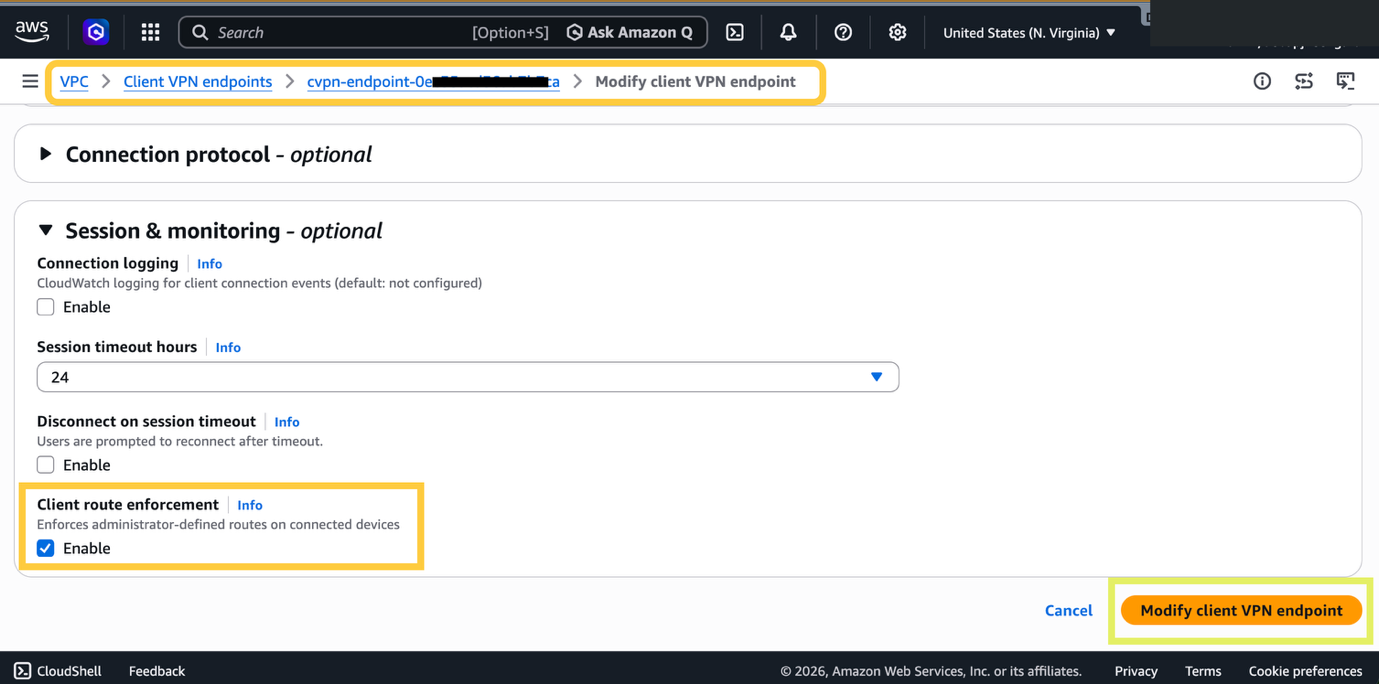
Figure 4: Enabling Client VPN Route Enforcement for existing Client VPN endpoint
The following walkthrough covers how to activate Client Route Enforcement on an existing Client VPN endpoint and verify the configuration. You can also activate Client Route Enforcement when creating a new endpoint.
Prerequisites
Before you begin, verify that the following are in place.
- An existing Client VPN endpoint with at least one associated subnet
- Permissions to modify Client VPN endpoints (ec2:ModifyClientVpnEndpoint)
- AWS CLI version 2 installed and configured (if using the command line)
- AWS-provided VPN client application version 5.2.0 or higher deployed to end-user devices
Step 1. Activate Client Route Enforcement from the Amazon VPC console
For more information on modifying Client VPN endpoints, refer to Modify a Client VPN endpoint.
- Open the Amazon VPC Console.
- In the navigation pane, choose Client VPN Endpoints.
- Select the endpoint you want to modify, choose Actions, and then choose Modify Client VPN endpoint.
- Under Session & monitoring section, select the Enable checkbox for Client Route Enforcement.
- Choose Modify Client VPN endpoint.
Note: For new Client VPN endpoints, you can enable Client Route Enforcement during creation under the Session & monitoring section by selecting Enable for Client route enforcement.
The change takes effect for new connections immediately. Existing sessions receive enforcement upon reconnection. Modifications to Client VPN endpoints can take up to 4 hours to propagate fully.
You can also activate Client Route Enforcement using the AWS CLI. Run the following modify-client-vpn-endpoint command, replacing the endpoint ID with your own.
aws ec2 modify-client-vpn-endpoint –client-vpn-endpoint-id cvpn-endpoint-02axxxxxe6 –client-route-enforcement-options Enforced=true –region us-east-1
Step 2. Verify the configuration
After activating Client Route Enforcement, verify that the setting is applied to your endpoint. For more information, refer to View Client VPN endpoints.
- In the Amazon VPC Console, navigate to Client VPN Endpoints.
- Select your endpoint and review the Details tab.
- Confirm that Client Route Enforcement shows Enforced.
You can also verify using the describe-client-vpn-endpoints AWS CLI command.
aws ec2 describe-client-vpn-endpoints \ –region us-east-1 \ –client-vpn-endpoint-ids cvpn-endpoint-02a04xxxxxx3e6 \ –query ‘ClientVpnEndpoints[0].ClientRouteEnforcementOptions’The response includes the enforcement status.{ “Enforced”: true }
Cleanup
To revert the configuration, follow these steps. For more information, refer to Modify a Client VPN endpoint.
- In the Amazon VPC Console, navigate to Client VPN Endpoints.
- Select your endpoint, choose Actions, and then choose Modify Client VPN endpoint.
- Under Client Route Enforcement, clear the Enforced setting.
- Choose Modify Client VPN endpoint to save the change.
Deactivating Client Route Enforcement does not disconnect active sessions. Users on existing connections stop receiving route enforcement once they reconnect.
Limitations and considerations
- Client Route Enforcement protects VPN routing integrity at the application layer, mitigating route-injection issues such as TunnelVision (CVE-2024-3661) that use DHCP to divert tunnel traffic. It does not modify kernel-level drivers or OS firewall rules. Where your environment supports it, complement Client Route Enforcement with endpoint detection and response (EDR) or mobile device management (MDM) solutions for additional device-level controls.
- You can only use route enforcement with the AWS-provided VPN client. Third-party OpenVPN-compatible clients do not support this feature.
- The feature takes effect when a user connects to the endpoint and it is already enabled. Active sessions at the time of activation are not affected until they disconnect and reconnect.
- The feature governs how traffic reaches its destination, not which destinations you are permitted to access. Authorization rules serve that purpose. Both features work together and are needed for a comprehensive access control strategy.
- This feature enforces routing paths and does not perform traffic inspection or filtering. For content-level security, use security groups, network ACLs, AWS Network Firewall, or third-party appliances in the traffic path.
- Client Route Enforcement applies only to the main routing table of the connected device. It does not enforce policy-based routing or interface-scoped routing. If your environment uses these routing mechanisms alongside the VPN, add controls to protect those paths.
Best practices
- Upgrade client software first – Before activating Client Route Enforcement, verify that users have updated to the AWS-provided VPN client version 5.2.0 or higher (5.3.0 for IPv6). Users on older versions or third-party clients do not receive enforcement.
- Test in a non-production environment – Activate Client Route Enforcement on a test endpoint first to confirm that it does not interfere with legitimate routing requirements, particularly for users who run local development tools or VPN-aware applications.
- Combine with split-tunnel for targeted enforcement – If your organization does not require full-tunnel routing, use split-tunnel with Client Route Enforcement to protect corporate traffic while allowing direct internet access for non-sensitive destinations.
- Monitor connection logs – Use Client VPN connection logs to track connection events and identify users who run unsupported client versions.
- Communicate changes to users – Notify users before activation, particularly those who rely on custom routes for local development workflows.
- Full-tunnel configuration routes client traffic (0.0.0.0/0 or ::/0) through the VPN tunnel. With Client Route Enforcement active, an attempt to add a more specific route that would divert traffic outside the tunnel is automatically corrected. This suits organizations that require remote traffic to traverse corporate inspection points.
- Split-tunnel configuration routes only specific CIDRs through the tunnel, while other traffic uses the local internet path. Client Route Enforcement enforces the administrator-defined routes for those specific CIDRs. Traffic destined for addresses outside the defined routes continues to flow through the local path as expected. This configuration balances security for corporate resources with performance for general internet access.
Conclusion
This post showed how Client Route Enforcement adds a layer of protection to your AWS Client VPN deployment by maintaining administrator-defined routes on connected devices. By monitoring and correcting route table modifications, Client Route Enforcement prevents traffic from bypassing the VPN tunnel, whether caused by user action, local software, or misconfiguration.With an activation process that works with existing endpoints, Client Route Enforcement integrates with your existing Client VPN architecture without requiring infrastructure changes. Combined with split-tunnel or full-tunnel configurations, you can have confidence that remote access traffic follows the intended path.To get started, activate Client Route Enforcement on your Client VPN endpoint by following the walkthrough in this post. To learn more, refer to the following resources:
About the authors