What the Black Hat NOC Taught Me About MCP & Agentic SOCs (Chapter 2 of 4)
The first time an MCP (Model Context Protocol) server felt real to me, it wasn’t because of a clean demo. It was because of the noise.
TL;DR: The harness matters more than the protocol, and the evidence matters more than both. MCP earns its keep when it shortens the path from a good security question to trustworthy evidence, and almost everything interesting about making that work happens in the harness wrapped around the model. In this series, I will cover how to build an MCP for an AI SOC.
Chapter 2
Building the harness: Constraints, context, and code
Knowledge isn’t just for knowing; it’s for doing. But if you connect a powerful AI to your security stack without the proper guidance, that knowledge quickly degrades into noisy hallucinations. Building the harness is where you turn a novelty into a powerful capability. By bounding the workflow and structuring how the system retrieves context, you give the AI and your analysts the confidence to operate efficiently.
This chapter includes:
- Teaching the system how analysts actually pivot
- Understanding tool sprawl
- Distinguishing known data vs. live data
- Meet them where they are
Teaching the system how analysts actually pivot
The most useful pattern I found while creating my MCP was encoding what I called core concepts. These were investigation shortcuts that experienced operators would already have in their heads. Writing these out allowed the model to follow similar paths instead of guessing which one to take.
For Corelight and Zeek network data, a useful core-concepts block looks something like this.
When I left out the core concepts, the model could sometimes figure it out, but it often wandered. It burned tokens. It started in the wrong place, over-queried, or produced a summary that sounded confident but wasn’t actually grounded. If I made the core concepts explicit, it reached useful evidence faster, used fewer tokens, produced more consistent results, was easier for a human to inspect, and was less likely to confuse something “interesting” with something “important.”
This same principle applies way beyond Zeek. Whether you’re wiring AI to an EDR, a ticketing system, an identity store, a vulnerability platform, or a data lake, the rule holds. Whatever the experienced operator does instinctively shouldn’t stay trapped in that person’s head. Write it down. Encode it. The model invariably does better when you stop asking it to rediscover your workflow from scratch.
Understanding tool sprawl
My first MCP was tool-heavy. Every capability became a tool. Every log type wanted its own function. Every query pattern wanted a little more prompt context. It worked until it didn’t.
At one point I had 38 tools. In my setup, the practical ceiling, where tool descriptions would drown out the context window, was around 40 tools. That ceiling moved with the model and with progressive-disclosure patterns, but the shape was always the same. Every load dragged the whole tool belt into context before the model could answer anything.
The way out was code mode. Instead of using dozens of narrow tools, I moved to a small number of tools that let the model write and execute bounded Python in a controlled environment. That collapsed 38 tools down to three, and eventually to one primary execution path per data source. The pattern has well-published precedent now: Cloudflare’s “Code Mode” post, Anthropic’s “Code execution with MCP,” and Nvidia’s write-ups from late 2025 all describe the same shape. These were the inspiration for the stack I rebuilt for Black Hat Europe in December 2025, the first live environment where I had code mode in the loop.
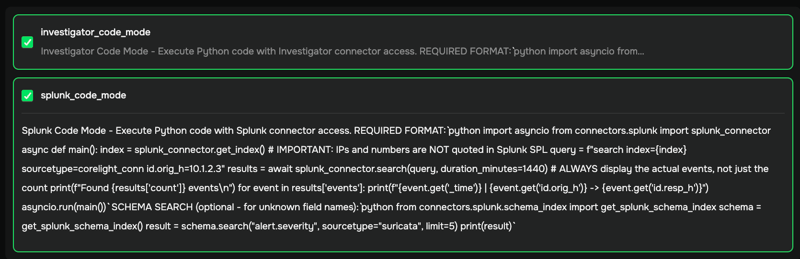
It sounds scary until you define the controls. The execution environment runs in a Docker container with network access scoped to only the endpoint it needs. Permissions are narrow. Every call is disposable, destroyed and rebuilt. The system doesn’t get broad write access just because it can write code. That isolation is the starting point, not the finish line.
The piece that made this work at scale was a just-in-time schema index. Some of our schemas were huge. One that I remember was over 20,000 lines long. You wouldn’t want that included in every prompt. I indexed the schema so the model could pull only the slice it needed on demand. Ask about DCE-RPC and you get the six lines that matter, not the universe. Call it lazy schema retrieval, schema RAG, progressive disclosure, or whatever you like. It is a simple pattern, and it lets code mode reach across more data types without forcing every possible operation into the initial context window.
Distinguishing known data vs. live data
When developing an MCP, you have to build for two types of data. One bucket is known data. For me, that was CTF attack campaigns with answer keys. But for most organizations, it could be static sample sets, replayed historical incidents, synthetic attack traffic, or a sanitized piece of a past investigation. The format isn’t the point. The point is that you already know what the right answer looks like. The other bucket is live operational data, where you don’t.
Known data gives you something live data rarely does. You can build golden datasets. You can measure whether the model found the right compromised host, the right command injection, the right next step, or the right query path. You can compare how different language models perform against each other and identify where one excels and where it falls behind. You can measure token usage. You can watch real users ask questions in their own messy ways and then improve the harness from the traces.
In February of this year, we ran a CTF for 35 people. Each user had a browser-based MCP client chat app and direct Splunk access to the same data the MCP was querying. They could solve it with chat, with Splunk, or both. We added a graduation-cap button in the chat UI that exposed the exact SIEM query behind any answer, copy-pasteable into Splunk. Credit to Eldon Koyle on our TME team, whose whole point was that the CTF should leave people with skills, not just answers. I didn’t appreciate how much that single button would change the shape of the exercise. Finance people with no security background finished 30+ questions, because they were learning Splunk while they found answers to the CTF questions instead of just copy-pasting. The traces from those 35 users drove two evolutions, via reinforcement learning, in query optimization for code mode.
Known-data exercises also expose operational limits. At an earlier DC435 meetup, we handed out an early MCP with Gemini CLI and a preloaded key. One member ran eight tmux windows in parallel, and we blew through the billing cap in 10-15 minutes. Not glamorous, but real. If a room of motivated users can break your rate limits before the exercise is useful, the architecture isn’t done.
Known data can also make you overconfident. It’s curated and it has an answer key. Live data doesn’t always tell you what question you’re supposed to answer. It can have missing telemetry, weird baselines, accidental behavior, vendor quirks, partial failures, and human context that doesn’t live in a log field.
Here’s how the two work together:
- Use known data (CTF campaigns, sample sets, replayed incidents, synthetic traffic) to develop the harness, benchmark models, test queries, capture user behavior, and build golden answers.
- Use live SOC data to test whether the workflow survives ambiguity, scale, noise, missing context, and uncontrolled variables.
If you only use known data, you’re optimizing for a game. If you only use live data, you never get clean enough measurements to know whether the system is improving.
Meet them where they are
The other big lesson for MCP development came from user behavior, not model behavior. I might be able to get technical people to install an LLM CLI like Claude Code or Gemini CLI, wire up the MCP server, troubleshoot the config, and ask questions from a terminal. But each task narrowed the adoption path, and I lost people along the way. Even capable people don’t always want to jump through all the hoops.
A week before Black Hat USA 2025, I wired our MCP into our ChatOps tool that we used heavily during the conference. Adoption jumped. The same competent people who’d stand over my shoulder and ask me to run a query used the system themselves once the interface was somewhere they were already logged in. The browser app pushed it further. Instead of only chat, it exposed threat hunting queries, directionality views, MITRE-style pivots, and editable query previews. This was reminiscent of the “show the exact query” graduation-cap button from the CTF described in Chapter 1 of this series.
When developing AI tools, you shouldn’t confuse capability with adoption. If the first step needs a 15-minute setup explanation, you’ve already lost a lot of users.
With the harness and adoption out of the way, your MCP is ready to scale. In Chapter 3: Agents in the wild: Data, workflows, and retrieval, I will cover how static playbooks evolve into dynamic investigative skills, how they uncover the specific retrieval patterns that yield actual results, and how you can manage the cycle of continuous development while still keeping your tools grounded.