Cisco Dynamic Trunking Protocol (DTP): The Default Worth Turning
First, what a trunk is
To see why DTP matters, you need the idea of a trunk, and for that you need VLANs.
A VLAN, or virtual LAN, is a way of slicing one physical network into several logical ones. The guest wifi, the staff computers, the card terminals and the security cameras can all share the same switches and cabling while behaving as though they sit on separate networks that cannot see each other. It is one of the most common and most useful boundaries in any building’s network.
Most ports on a switch carry just one VLAN. These are access ports: the computer on a desk belongs to the staff VLAN and nothing else. The links between switches, though, have to carry every VLAN at once, kept apart by a small label stamped onto each frame as it crosses. A link like that is a trunk, and the labelling follows an open IEEE standard, 802.1Q. Trunks are how a building full of switches still manages to behave like a tidy set of separate, isolated networks. Those same inter-switch links are also where spanning tree does its quiet work, keeping a redundant path from becoming a loop.
What DTP was built to do
Configuring every trunk by hand, port by port, is tedious work, especially across a large site. Cisco’s answer, years ago, was to let the switches arrange it among themselves. Dynamic Trunking Protocol, DTP for short, is a Cisco protocol that lets two switches negotiate whether the link between them should become a trunk, and how it should be labelled, with nobody configuring either end.
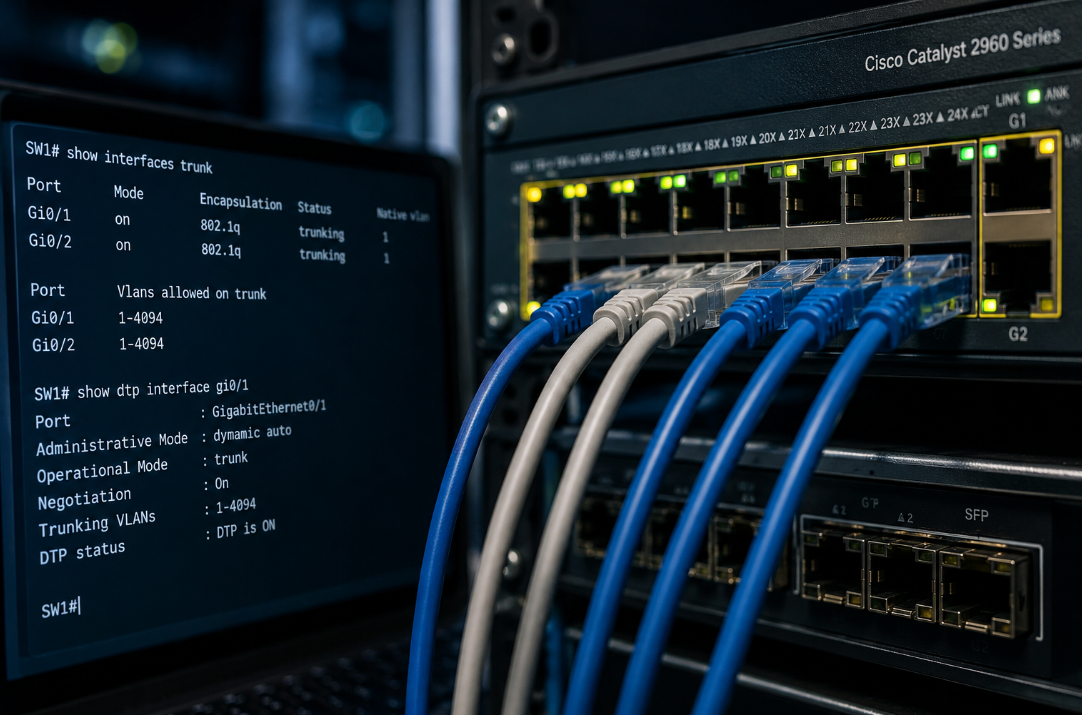
A port taking part in DTP sits in one of a handful of modes. In dynamic desirable it actively asks the far end to form a trunk. In dynamic auto it waits to be asked, and agrees if it is. Stand a desirable port next to an auto port, or two desirable ports together, and a trunk forms on its own. The two static modes, access and trunk, pin the port as one or the other, and a separate command can switch the negotiation off altogether. For a long time the out-of-the-box default on many Cisco switches was one of the dynamic modes, which means a switch taken fresh from the box is often willing to strike up a trunk with whatever appears on the wire.
The exact default has shifted over the years and varies by model and software version, so the honest answer to “is DTP active here?” is almost always “check, do not assume”. Plenty of live networks still have ports sitting in a dynamic mode without anyone ever having chosen it. For an engineer wiring a comms cabinet, that automatic behaviour really is convenient. The trouble is who else gets to ask.
Where the convenience becomes a hole
DTP has no meaningful idea who it is talking to. It assumes the device at the other end of the cable is a co-operative Cisco switch. There is nothing that says it has to be.
If a port is sitting in a dynamic mode, a laptop running the right tool can speak DTP back to the switch, announce itself as a switch, and negotiate a trunk. The instant that trunk comes up, the laptop stops being a single device on a single VLAN and starts receiving the traffic of all of them. The neat separation between guest wifi, internal systems and payment devices simply dissolves for that machine. This is the best-known form of an attack called VLAN hopping, and the DTP-driven version is known as switch spoofing.
None of this is hard or hypothetical. Picture the steps. Someone finds a live network socket that nobody is watching: a point in a meeting room, an unused desk in reception, the port behind a screen in a waiting area. They plug in a laptop. A free tool such as Yersinia sends the DTP frames. The switch, still in its helpful default, agrees to form a trunk. And the visitor now has a view of every VLAN on that switch. It is a standard opening move in physical penetration tests, precisely because it works so often. There is a second VLAN-hopping trick, known as double tagging, that abuses the native VLAN rather than DTP, but switch spoofing is the one DTP serves up directly.
Why a business should care
It is tempting to file all this under things for the IT team to fret about. But the reason those VLANs exist is almost always a decision the business has already made, even if it was never written down as a security policy.
Keeping card-payment devices apart from everything else is frequently a hard requirement under standards like PCI DSS, not a nice-to-have. Separating guest wifi from internal systems is the entire reason guest wifi is its own VLAN in the first place. Corralling cameras, door entry and other internet-connected gadgets onto their own segment is how a cheap device with sloppy firmware is stopped from becoming a route into everything important. When DTP lets someone trunk in, all of that quietly comes undone. The segmentation you depend on, and may well be audited against, turns out to be optional for anyone who can reach an unguarded socket.
It also sidesteps most of the controls people assume will protect them. A locked server room does nothing about a network point in an open meeting room, and a firewall sitting at the edge of the network never sees the traffic that is hopping between VLANs inside it. Put plainly: a single unattended port in a reception area should never be a master key to the whole network. Where DTP has been left switched on, that is sometimes exactly what it is.
Turning it off, and trunking on purpose
The fix is well established and costs nothing but a little attention. The rule of thumb is that a port should always be told what it is, and never left to work it out by negotiation.
For the ports that people actually plug into, that means fixing them as access ports with switchport mode access, so they stay in a single VLAN and stop speaking DTP altogether. For the real links between switches, it means declaring them trunks deliberately with switchport mode trunk and then adding switchport nonegotiate, which turns DTP off on that link so it will not auto-trunk with whoever asks. While you are in there, it is good practice to move the native VLAN off the default VLAN 1 and onto an unused one, which closes the double-tagging door at the same time.
Confirming the current state is just as quick: a look at a port’s settings, with a command like show interfaces switchport, tells you which mode it is in and whether negotiation is on, and monitoring can flag a port that has negotiated a trunk it never should have. On an estate of any size, that check belongs in the standard build for every switch, not a one-off tidy-up.
This is not fringe or paranoid advice. Disabling features you do not use and changing insecure defaults is the heart of secure configuration, one of the five controls in the UK’s Cyber Essentials scheme, and turning DTP off specifically is set out in Cisco’s own hardening guidance and in essentially every serious switch baseline. On a network built by someone who knows the terrain, DTP is simply off, and trunks exist only in the handful of places they were deliberately created.
The pattern worth noticing
DTP is a small instance of a much larger theme. Networks are full of features designed in a more trusting time and left on by default because they smoothed the path for whoever installed the kit, back when the only things that ever plugged in were other trusted devices. Open offices, public spaces and a market full of cheap attack tools changed the threat. The defaults, very often, did not change with it.
You do not need to know which features those are. Working that out is the job of whoever designs and maintains your network. What is reasonable is to expect that the question has been asked at all, and that the convenient defaults have been switched off wherever they quietly trade your security for someone else’s saved ten minutes. If you cannot say for certain whether that has happened on your own network, it is worth finding out.