Building extranet on AWS: Secure, scalable partner connectivity
When building extranet connections between external partners and your AWS infrastructure, an integration project can become a task that requires additional work hours, additional costs, and communication inconsistencies.
This post describes a secure, scalable and resilient architecture pattern for a modern extranet architecture on AWS, that minimizes commonly issues faced by usual designs: overlapping address spaces, complex routing requirements, and operational overhead from managing multiple partner connections. Increasingly constrained IPv4 addresses intensify these challenges for enterprises. The proposed architecture combines to mitigate these problems. These services isolate partner traffic and scale with your business needs while optimizing the use of IPv4 non-overlapping address spaces.
An extranet is a controlled private network that allows external organizations to access specific resources within your infrastructure. Unlike a public-facing website or API, an extranet provides deeper integration. A successful extranet demands reliable, dedicated connectivity between your organization and external partners while maintaining strict network boundaries. Each partner must operate in complete isolation from others, with no possibility of IP address conflicts that could disrupt communications. As your business grows, the architecture must accommodate new partners seamlessly without requiring complex reconfiguration of existing connections.
Most organizations use RFC 1918 private address spaces internally. When two partners share the same private CIDR, routing breaks down without Network Address Translation (NAT) or IP re-addressing. Common approaches include multi-step NAT configurations, proxy servers, or asking partners to renumber their networks, all of which introduce operational overhead and potential points of failure.
Security and compliance often mandate that partners cannot communicate with each other through your infrastructure. Partner isolation prevents lateral movement in case of a security event, supports data privacy between competitors who might both be your partners, and streamlines compliance auditing by creating clear network boundaries.
The foundation of the proposed extranet architecture is an Extranet VPC, a central Virtual Private Cloud (VPC) that acts as the meeting point between internal services and external partners. Each partner connects to this Extranet VPC via AWS Direct Connect (DX) using a Transit Virtual Interface (Transit VIF) terminated on the AWS Direct Connect Gateway (DXGW) associated with an AWS Transit Gateway (TGW) attached to the Extranet VPC.
Regarding the IPv4 address plan, if you own an IPv4 CIDR block, you can bring your IP addresses to IPAM (BYOIP) or you can provision Amazon-owned public IPv4 blocks to IPAM pools.
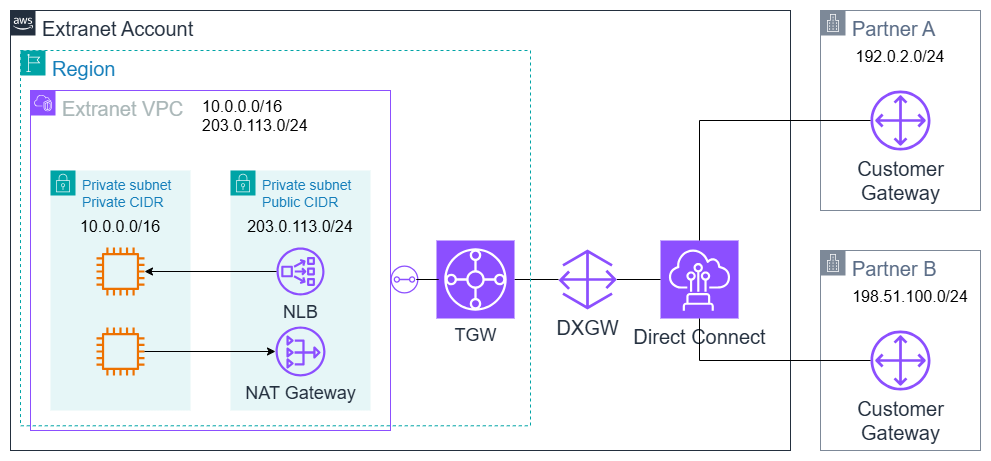
Figure 1: Example of an extranet VPC connected with two partners via Direct Connect, Direct Connect Gateway and Transit Gateway
Although we have other approaches for connecting different partners, including: 1/ Use of AWS PrivateLink, 2/ Use of Amazon VPC Lattice with Resource Endpoint, or 3/allocating a CIDR block agreed upon with the partner, this approach offers a solution that allows communication between two companies even when one of them is not running their workloads on AWS.
Dedicated connection and routing isolation
Once the scenario involves connectivity with multiple partners via AWS Direct Connect, and for partner segregation purposes, the solution will use the Transit VIF + DXGW + TGW approach. Each partner receives its own virtual interface (dedicated VLAN) associated with a centralized DXGW, which scales to 30 partners per DXGW.
The architecture design delivers a powerful security level combining two AWS service features to properly isolate the solution layers:
- The solution uses DXGW allowed prefixes to choose the routes that the external partner will receive in its route tables; therefore, the DXGW will not propagate routes from one partner to another.
- TGW routing domain segmentation using the association of the VPC attachment to one route table and the propagation of VPC CIDRs to specific route tables.
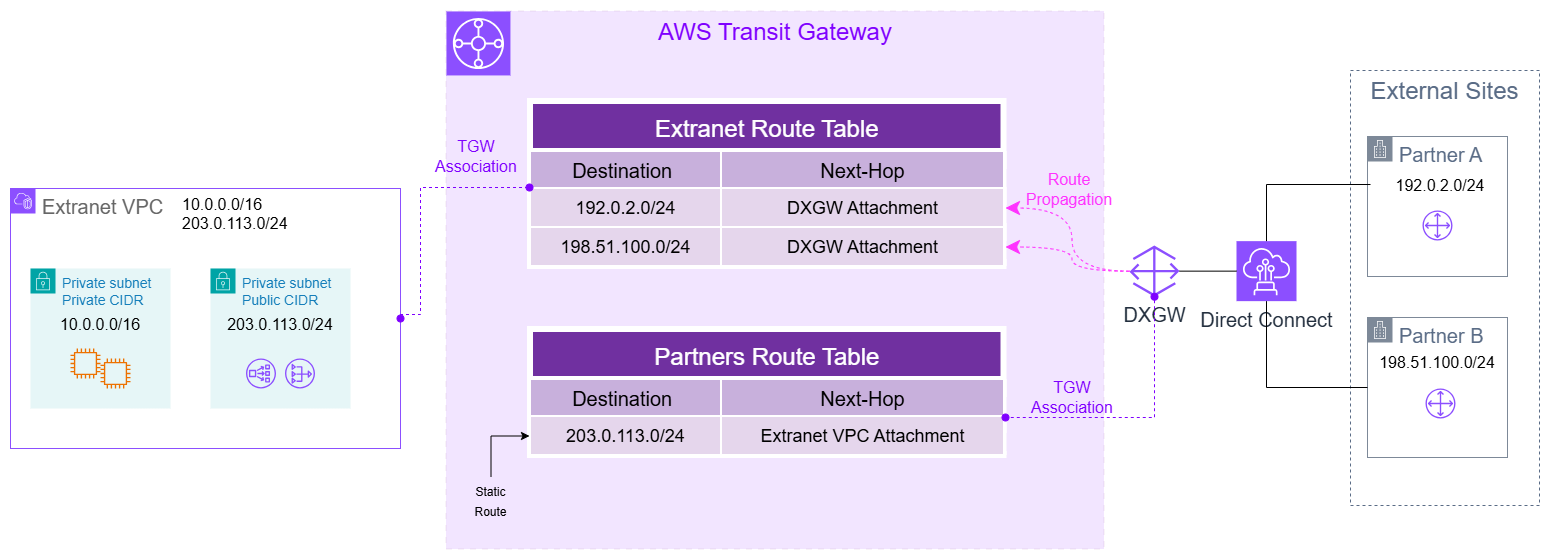
Figure 2: Example of route domains allowing the partners to communicate only with Extranet VPC Public IPv4 address space only, and allowing Extranet VPC to communicate with partners
On-premises extranet designs typically use configurations such as Virtual Routing and Forwarding (VRF) instances, route filtering policies, and firewall rules. One misconfiguration can expose one partner’s network to another. With DXGW and TGW, this isolation is architectural, not configurational. Only the Extranet VPC administrators can make any modifications.
Consider creating alarms to monitor API calls that could potentially compromise route isolation between partners, such as UpdateDirectConnectGatewayAssociation, CreateTransitGatewayRoute, and CreateTransitGatewayRouteTable.
After the allowed prefix CIDRs are configured, DXGW will only advertise this specific group of routes to partners, preventing advertisement of routes learned from other partners. For additional security, you can implement traffic inspection using AWS Network Firewall or third-party solutions to monitor and filter inter-partner communications. For detailed implementation guidance, see the AWS Network Firewall documentation.
Let’s say Partner A uses CIDR 192.0.2.0/24, Partner B uses CIDR 198.51.100.0/24 and your Extranet VPC uses CIDR 203.0.113.0/24.
This means:
- Partner A receives a BGP announcement for 203.0.113.0/24 (the Extranet VPC CIDR), and nothing else;
- Partner B also receives a BGP announcement for 203.0.113.0/24 (the Extranet VPC CIDR), and nothing else;
- Neither partner ever learns the other’s CIDR block (192.0.2.0/24, 198.51.100.0/24) through BGP;
- The Extranet VPC subnets have a default route to the VPC TGW attachment that is associated with a route-table that receives the DXGW routes through propagation.
From each partner’s perspective, the only reachable destination through the Direct Connect link is the Extranet VPC public CIDR address space. Other partners are invisible at the routing layer; they have no route to reach them, and no awareness they even exist. The same routing isolation principles apply to partners with their own AWS organization who use separate accounts and VPCs.
IP version
In extranet architectures, the standard solution to avoid IP conflicts is to use public IP address space for the Extranet VPC. Public IPs are globally unique, which means your extranet CIDR will never overlap with any partner’s internal network. Which means it eliminates the need for multi-step NAT workarounds between overlapping private ranges.
On AWS, there are two ways to obtain public IPv4 address space for your Extranet VPC:
- Bring Your Own IP (BYOIP): If your organization already owns public IPv4 address space (a /24 or larger registered with ARIN, RIPE NCC, or another Regional Internet Registry), you can bring it to AWS. You can allocate these addresses as Elastic IP addresses or use them as VPC CIDR blocks through IPAM pools. A significant cost advantage; BYOIP addresses are not charged the standard public IPv4 fee that applies to Amazon-provided addresses;
- Amazon-Provided Contiguous IPv4 Blocks: If you don’t own public IP space, you can request Amazon-owned contiguous public IPv4 blocks (between /18 and /28). These provide sequential addresses that simplify partners allow policies. AWS charges these blocks per public IPv4 address per hour, regardless of whether the addresses are in use or idle;
Both options require IPAM. IPAM Free Tier includes BYOIP (both IPv4 and IPv6) and Amazon-provided contiguous blocks for both IPv4 and IPv6, Public IP Insights for visibility into your public IPv4 usage and Bring Your Own ASN (BYOASN) for BGP route origin control.
Dual-stack with IPv6
Rather than choosing between IPv4 and IPv6, you configure your Extranet VPC as dual-stack, supporting both IP versions simultaneously. In dual-stack mode, the VPC carries both an IPv4 CIDR (public, via BYOIP or Amazon-provided block) and an IPv6 CIDR. Each subnet, route table, Security Group, and Network ACL handles IPv4 and IPv6 traffic independently. Partners can communicate with your extranet using whichever IP version their network supports.
IPv6 provides a significant advantage to extranet design: Global Unicast Addresses (GUAs) are guaranteed to be unique. When you enable IPv6 on an AWS VPC, Amazon assigns a /56 GUA CIDR from its own allocation. IANA and the Regional Internet Registries manage these globally routable, non-overlapping blocks. No two organizations will ever receive the same IPv6 GUA block, which means that with IPv6, address conflict is no longer an issue to be taken care of.
If your organization owns its own IPv6 allocation (a /48 or a larger address space), you can also use BYOIPv6 to bring those addresses to AWS through IPAM, maintaining your existing IPv6 identity with partners who already recognize your address space.
IPv6 also delivers clear cost advantages: AWS does not charge for IPv6 addresses, configuring dual-stack on your VPC incurs no extra charges, and IPAM Free Tier covers all IPv6 management. We strongly recommend deploying dual-stack from day one to future-proof the extranet while maintaining full backward compatibility with IPv4-only partners.
VPC multiple CIDR
Not every resource in your Extranet VPC needs a public IPv4 address. Only the resources at the partner-facing subnet require public addressing. Everything else can run on private IPs, completely hidden from partner networks.
AWS VPCs allow multiple CIDR blocks. You can associate up to five IPv4 CIDR blocks with a single VPC, and each CIDR block can be from a different address range, including a mix of private and publicly routable addresses. This capability enables a cost-optimized extranet design. The Extranet VPC will be created with two IPv4 CIDR blocks:
With two CIDRs in place, two distinct types of subnets will host resources:
Internal Subnets (Private CIDR):
- Application and data resources: Amazon Elastic Compute Cloud (Amazon EC2), , and any other AWS services;
- These resources use private IPs only. They are never directly reachable by partners;
- The private CIDR provides a large address space at zero public IPv4 cost;
Partner-accessible Subnets (Public CIDR):
- NAT Gateways: these perform Network Address Translation for outbound traffic from internal resources to partners. NAT Gateway’s public IP is the only address partners see when your internal services initiate communication;
- Elastic Load Balancing (ELB): these are the entry points for partner-initiated traffic. Partners send requests to the ELB public IP, and the ELB forwards them to internal resources on private IPs;
- These subnets consume public IPv4 addresses, but the count is minimal, typically 2-4 NAT Gateways (one per Availability Zone) and a handful of ELB nodes;
Important: When mixing private and public IPv4 CIDRs in a single VPC, the private CIDR must be the primary (created first with the VPC). You then associate the Public CIDR as a secondary block per VPC requirements.
This architecture strengthens also the extranet’s security posture:
- Reduced exposure: Internal resources have no public IP. Even if a partner’s network has inadvertent access, the unauthorized user cannot directly address your EC2 instances or databases;
- Centralized ingress/egress control: All partner traffic flows through a small number of well-defined partner-facing resources (ELBs and NAT Gateways), making it easier to monitor, log, and apply security policies;
- Clear network segmentation: The separation between partner-facing subnets (public CIDR) and internal subnets (private CIDR) creates a natural DMZ-like boundary within the VPC. Security Groups and NACLs can enforce strict rules at this boundary;
- Streamlined allowlist: Partners only need to allow a small, stable set of public IPs (NAT Gateway and ELB addresses) rather than a constantly changing list of individual resource IPs;
A dual-CIDR model works well with the dual-stack IPv6 strategy. Your VPC ends up with three CIDR blocks: private IPv4 for internal resources, public IPv4 (BYOIP) for partner-facing resources only, and IPv6 GUA for all resources (free, globally unique). Partners that support IPv6 communicate directly over the GUA addresses without needing NAT. Partners still on IPv4 use the ELB and NAT Gateway path through the public CIDR.
Building a resilient, growth-ready extranet on AWS requires thoughtful design across several networking dimensions, dedicated connectivity, routing isolation, IP address management, and cost optimization. In this post, we described an architecture that addresses each of these challenges using native AWS services.
We started with AWS Direct Connect and Transit VIF to establish dedicated, point-to-point connections with each partner. The Direct Connect Gateway (DXGW) only advertises allowed prefixes, supporting isolation so partners can never communicate with each other through your infrastructure. The TGW route domains extend this isolation by placing each partner’s attachment in its own routing table, so traffic is contained within a dedicated domain that reaches only the Extranet VPC and never another partner. That mitigates an entire class of misconfiguration risks inherent in complex routing scenarios.
This post explained how public IPv4 and IPv6 dual-stack can solve IP conflict problems. IPv6 Global Unicast Addresses eliminate address conflicts entirely, while dual-stack enables backward compatibility with IPv4-only partners. VPC IPAM Free Tier manages both address families.
Finally, we explained how a dual-CIDR VPC design, with a private primary CIDR for internal resources and a small public secondary CIDR for service exposure to partners through Elastic Load Balancers minimizes public IPv4 consumption and strengthens security by hiding internal addressing from partners.
This approach delivers an extranet architecture that is secure by default, cost-efficient, and ready to expand partner connectivity operationally. As next steps, begin with a pilot deployment for one partner, plan public IP addressing, configure Transit VIF, isolate route tables on Transit Gateway. To get started, check out the following documentation:
About the authors

Leonardo Azize
Leonardo Azize is a Solutions Architect in the financial industry.
His background is in development and infrastructure for web applications, working on large enterprises.
When not working, Leonardo enjoys time with family and plays with his daughter.

Felipe Tavares
Felipe Tavares is Technical Account Manager for Enterprise Support Customers.
His professional experience encompasses Networks, Security, and DevOps, working in critical client environments, Data Centers, and Service Providers.
Felipe loves to play musical instruments and play board games with his 3 children.