Implementing encryption in transit across connectivity patterns with VPC Encryption Controls
Security and compliance teams managing modern cloud environments often ask us: “How do we enforce encryption in transit across every network path? Can we put in place policies that restrict teams from sending unencrypted traffic between any two nodes?”. Your environment likely includes a mixed fleet of Amazon Elastic Compute Cloud (Amazon EC2) instances across several instance families, managed services like Amazon Relational Database Service (Amazon RDS) and Amazon Redshift, load balancers, peering connections, and hybrid connectivity paths. In many cases, traffic is already encrypted. Applications may be using TLS, instances may be running on encryption-capable hardware, and managed services may be enforcing secure connections. But as a security or network administrator operating at the infrastructure level, you often cannot tell.
This matters in regulated industries where organizations need to demonstrate encryption compliance for Health Insurance Portability and Accountability Act (HIPAA), PCI DSS, FedRAMP, Criminal Justice Information Services (CJIS) and Internal Revenue Service Publication 1075 controls. The challenge isn’t just turning on encryption; it’s proving that encryption is consistently applied across every service, every connection, and every traffic flow within your Amazon Virtual Private Cloud (Amazon VPC) environments. Organizations also need a mechanism to prevent someone from accidentally launching a non-compliant resource that breaks the intended encryption posture.
VPC Encryption Controls addresses these gaps by providing centralized visibility and helping you audit and enforce encryption in transit within and across VPCs in a Region. In this post, we explain the AWS network encryption layers that protect data in transit across AWS global networks and share how you can use VPC Encryption Controls to first monitor and eventually enforce encryption across your environment. We show how VPC Encryption Controls evaluates and enforces encryption posture within and across VPCs. We then walk through reference architectures that identify encryption boundaries, interoperability constraints, and recommended configurations for turning on monitor and enforce modes across common connectivity patterns.
Encryption in AWS operates at multiple layers of the networking stack. Several of these layers are always active and require no customer action; others depend on configuration choices. We discuss the following encryption mechanisms that exist today.
Physical Network Encryption
All traffic leaving AWS secured facilities between AWS Regions over the AWS global network is automatically encrypted by AWS at the physical layer. AWS also encrypts all traffic between Availability Zones. This protects data in transit for those scenarios facing the highest risk, where physical security controls protecting the links are not possible. This optical encryption and MACsec encryption are automatically active by default for all traffic flowing within a Region or between Regions and require no customer action.
IPsec encryption with AWS Site-to-Site VPN
With AWS Site-to-Site VPN, you can securely connect your on-premises network or branch offices to Amazon VPC using IPsec encrypted tunnels. Data transferred between your VPC and on-premises network routes over an encrypted VPN connection to maintain the confidentiality and integrity of data in transit. You can configure encryption algorithms, integrity algorithms, and Diffie-Hellman group numbers for both Phase 1 and Phase 2 of the IKEv1 or IKEv2 negotiation. You authenticate tunnel endpoints using pre-shared keys or digital certificates. Refer to the tunnel options documentation for configuration details.
MACsec encryption with AWS Direct Connect and AWS Interconnect
AWS Direct Connect supports MACsec encryption to protect traffic at layer 2 between your on-premises router and Direct Connect router at the edge of the AWS network. MACsec delivers native, near line-rate, point-to-point encryption. It is available for dedicated Direct Connect connections with 10 Gbps, 100 Gbps, and 400 Gbps at select locations using AES 256-bit MACsec keys. AWS Direct Connect also supports MACsec on Partner-owned interconnects terminated on supported physical devices. We recommend that you work with your service provider to verify that your network traffic is encrypted through your providers’ network. Because MACsec is a point-to-point, hop-to-hop encryption mechanism, some customers prefer to run AWS Site-to-Site VPN over a Direct Connect connection for end-to-end encryption.
AWS Interconnect, a managed service that simplifies connectivity into AWS, extends MACsec-encrypted connectivity beyond traditional Direct Connect. AWS Interconnect – last mile and multicloud encrypts traffic between AWS network devices and partner devices using MACsec by default, and customer traffic is transmitted only when the encryption session is active. For encryption beyond the partner handoff point, consult your provider’s documentation.
Transport Layer Security (TLS) encryption
AWS uses TLS to encrypt your data in transit for communication between clients, applications and AWS services. Many AWS public service endpoints support or require TLS to protect API calls. For example, AWS Identity and Access Management (AWS IAM), AWS CloudFormation, and Amazon API Gateway require TLS for API calls. However, not all service endpoints enforce TLS universally; some services, including certain legacy API endpoints, still accept unencrypted HTTP connections. TLS applies to HTTPS API traffic, service-to-service communication, and connections to services like Amazon RDS or Amazon Aurora when SSL enforcement is turned on. AWS requires TLS 1.2 and recommends using TLS 1.3 when connecting to AWS resources.
Encryption provided by Amazon VPC peering, Transit Gateway peering, and AWS Cloud WAN
You can connect VPCs using VPC Peering or AWS Transit Gateway within the same Region. In both cases, traffic stays on the AWS backbone and never traverses the public Internet. Traffic is encrypted at the physical layer only when it traverses network links that are outside of the physical control of AWS.
All inter-Region traffic over VPC Peering, Transit Gateway Peering, and AWS Cloud WAN is automatically bulk-encrypted using AES-256 at the virtual network layer before it leaves AWS secured facilities. Key agreement and key management are handled by AWS. All traffic also receives physical layer AES-256 encryption when it traverses network links outside of the physical control of AWS, resulting in double encryption on those links. Traffic stays on the global AWS backbone and never traverses the public Internet.
AWS Nitro System hardware encryption
Traffic between EC2 instances powered by the AWS Nitro System is automatically encrypted at the hardware level by the Nitro Card. This encryption uses Authenticated Encryption with Associated Data algorithms with 256-bit encryption, operates below the operating system, and has no impact on network performance. For the current list of supported instance types and path requirements, see Encryption in transit in the Amazon EC2 User Guide. This hardware encryption protects eligible links without requiring application changes. It provides a strong baseline of confidentiality independent of whether application-layer TLS is configured. Hardware-level encryption works between hops, protecting traffic on the link between two Nitro-capable endpoints. Application-level encryption such as TLS provides end-to-end authentication and integrity between application processes but requires explicit configuration and ongoing management.
With VPC Encryption Controls, you can verify encryption posture centrally across your VPCs in a Region, and with declarative policies, apply and manage this setting across your entire organization spanning multiple Regions without per-VPC configuration. You get unified visibility into the encryption status of traffic flows within your VPC, and the ability to enforce encryption in transit within and across VPCs in a Region. You can turn on VPC Encryption Controls at the VPC level, at the account level, or across your entire organization or specific organizational unit (OU) using AWS Organizations declarative policies. VPC Encryption Controls operates in two modes: monitor mode and enforce mode.
Monitor mode allows you to audit the encryption status of traffic flows and identify resources that allow potentially unencrypted communication. Amazon VPC Flow Logs enrichment includes the encryption-status field, giving you visibility into whether traffic is encrypted using Nitro hardware encryption, application-layer encryption (TLS), or both. You can also use the console or the GetVpcResourcesBlockingEncryptionEnforcement command to identify resources that are not enforcing encryption in transit. When you turn on monitor mode, certain managed resources automatically and gradually migrate to encryption-capable hardware with no action required from you.
Enforce mode requires that only encrypted traffic flows can exist within and across the VPC. It blocks the creation or attachment of non-compliant resources that could produce unencrypted flows. It restricts Elastic Network Interfaces (ENI) to attach only to encryption-capable instance types. This applies whether these instances are controlled by you or used by AWS services like Amazon RDS or AWS Transit Gateway. New VPCs can be launched directly in enforce mode. Existing VPCs must start in monitor mode and transition to enforce mode after remediation and exclusion planning. You can create exclusions for certain resources while turning on enforce mode. To find the supported exclusions, refer to VPC Encryption Controls Exclusions.
Pattern 1: Single VPC with mixed resources
Consider a single VPC containing EC2 instances across several instance families (some Nitro-capable and some legacy), an Application Load Balancer fronting a web tier, AWS Fargate tasks running containerized services, and an Amazon RDS database in a private subnet. Figure 1 shows this mixed environment.
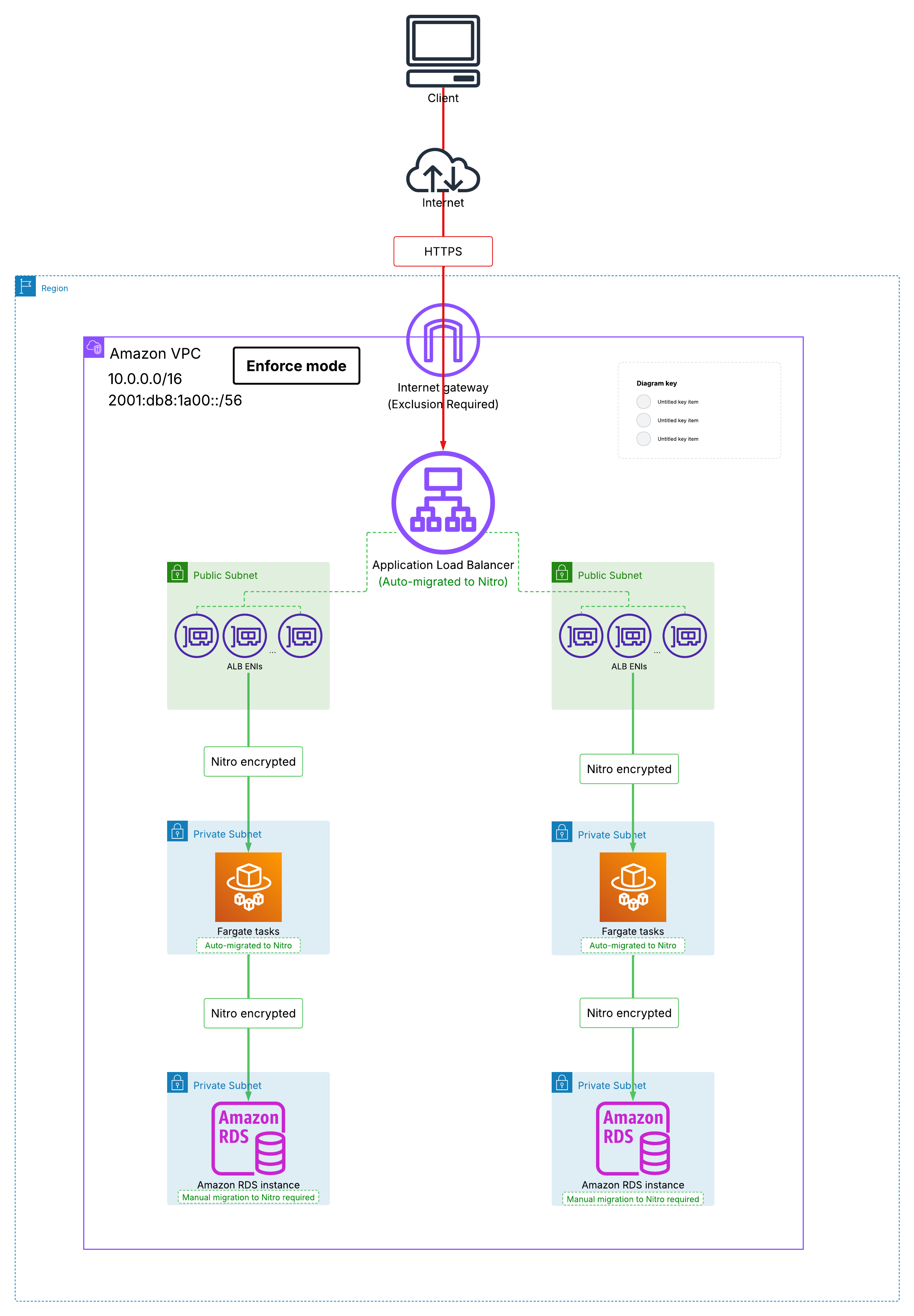
Figure 1: Single VPC with mixed resources
When you turn on monitor mode, your newly created flow logs that include the ‘encryption-status’ field reveal the encryption status of each traffic flow. Traffic between Nitro-capable encryption supporting EC2 instances is already protected by hardware encryption. Any legacy EC2 instance produces flows classified as unencrypted, because hardware encryption cannot apply when either endpoint lacks Nitro capability. AWS automatically migrates managed resources (including Application Load Balancers and Fargate clusters) to hardware that natively supports encryption. After automatic migration completes, traffic between the Application Load Balancer and Fargate tasks is protected by hardware encryption. Traffic from Fargate to Amazon RDS is protected by hardware encryption only after you manually migrate the RDS instance to a Nitro-capable DB instance class.
Hardware encryption provides link-level confidentiality. We recommend layering TLS on top for defense-in-depth. For Amazon RDS, SSL/TLS is available across all supported engines, and some engines enforce secure connections by default on newer versions. VPC Encryption Controls evaluates encryption between the Application Load Balancer and its targets, not the client-facing listener. We recommend configuring HTTPS listeners with certificates from AWS Certificate Manager (ACM) for client-facing encryption. In enforce mode, you must add an Internet Gateway exclusion, since traffic between the IGW and the Internet exits the AWS network boundary where VPC Encryption Controls cannot enforce encryption. If you use Network Load Balancers, you cannot use a TLS listener to offload encryption to the load balancer in enforce mode; your targets must terminate TLS themselves.
For resources that cannot meet encryption criteria (such as a legacy application pinned to a non-Nitro instance type), determine whether an exclusion applies or whether that workload must move to a separate VPC. For existing VPCs, you cannot switch to enforce mode until all non-compliant resources have been migrated or have exclusions configured. For new VPCs, you can turn on enforce mode at creation time, which prevents non-compliant resources from ever being launched.
Pattern 2: VPC Peering between two VPCs in the same Region
In this pattern, you have two VPCs in the same Region connected through VPC Peering. VPC Encryption Controls enforces posture independently on each side of the peering connection. In enforce mode, if both VPCs in the same Region operate without exclusions, encryption posture must satisfy enforcement criteria on both sides. Every ENI in each VPC must attach to an encryption-capable instance, and traffic traversing the peering connection is protected by hardware encryption at both endpoints. Enforcement remains local to each VPC; turning on enforcement in one VPC does not automatically impose encryption requirements on its peer.
If one VPC has defined exclusions or operates only in monitor mode, the enforcement boundary becomes asymmetric. In such cases, the enforcing VPC requires a peering exclusion (for VPC peering connections to VPCs without encryption in enforce or in a different Region) to maintain connectivity while preserving its own posture. Nitro hardware encryption between instances is independent of VPC Encryption Controls enforcement; Nitro-to-Nitro traffic remains hardware-encrypted across the peering connection regardless of the peering exclusion or the enforcement state of either VPC. Figure 2 illustrates this asymmetric enforcement model; green lines indicate Nitro hardware-encrypted path regardless of enforcement state.
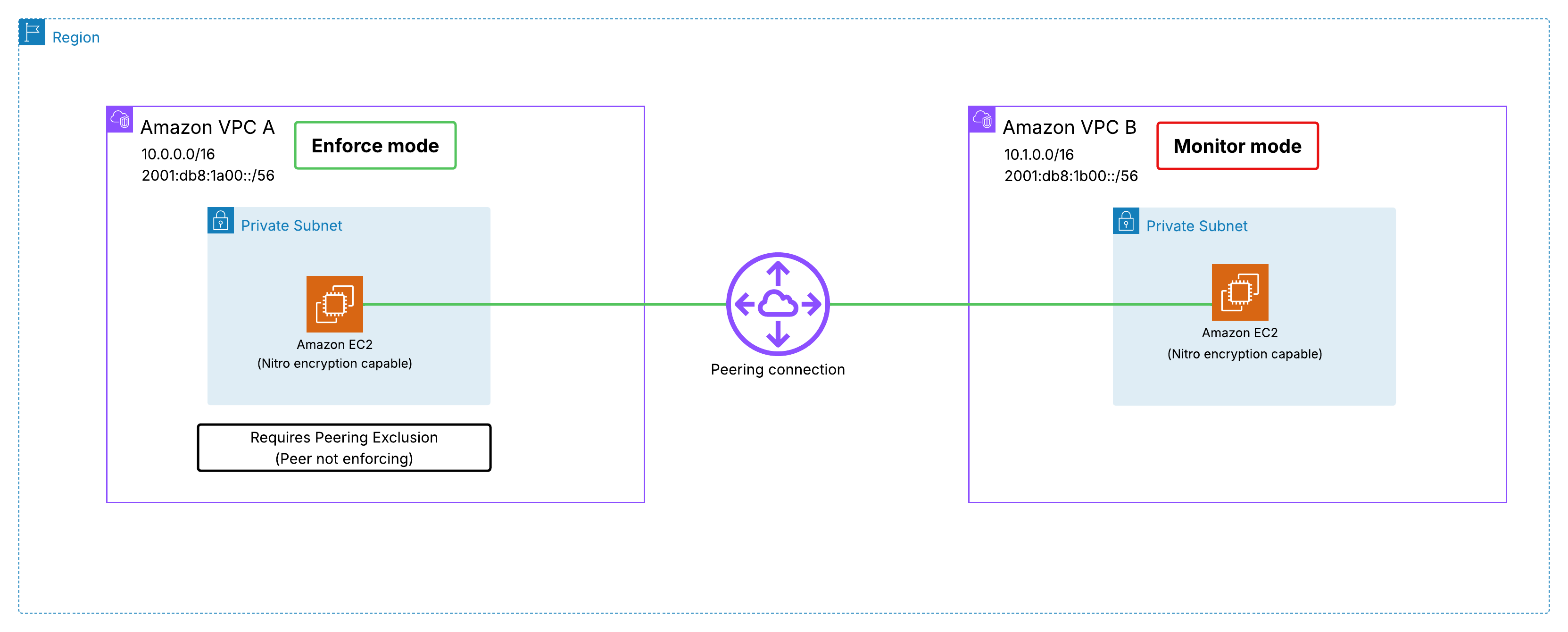
Figure 2: VPC Peering with VPC A in enforce mode with peering exclusion and VPC B in monitor mode
When one VPC is ready to enforce, add the peering exclusion if the other VPC has not transitioned yet; remove the exclusion once both sides are enforcing. Without that exclusion, traffic over the peering connection will be blocked in enforce mode. If you want to incrementally roll out encryption enforcement across large environments without requiring simultaneous activation on all connected VPCs, consider AWS Transit Gateway with encryption support turned on to address this at scale as discussed in Pattern 3.
Pattern 3: Hub and spoke with Transit Gateway and centralized east-west and egress traffic inspection
Many organizations route inter-VPC (east-west) and outbound (egress) traffic through a centralized inspection VPC containing AWS Network Firewall or Gateway Load Balancer with third-party appliances, connected through Transit Gateway. You want encryption enforcement on the spoke application VPCs while maintaining inspection capability in the middle.
To encrypt traffic flowing through the Transit Gateway data plane between VPC attachments, you must explicitly turn on encryption support on the existing Transit Gateway and meet the requirements. You can only add encryption support to an existing Transit Gateway (not during creation), and the migration process can take up to 14 days with no downtime or traffic disruption. With Transit Gateway encryption support turned on, traffic between two application VPCs in enforce mode (without exclusions) traverses 100% encrypted paths over the Transit Gateway.
You place spoke VPCs in enforce mode and keep the inspection VPC in monitor mode. At scale, declarative policies make this automatic: attach attempt_enforce at the organization root and override with attempt_monitor at the networking OU where your inspection accounts live. Spoke VPCs inherit enforcement, inspection VPCs stay in monitor, centrally managed without per-VPC configuration. As of this writing, VPCs containing AWS Network Firewall endpoints and Gateway Load Balancer endpoints cannot be placed in enforce mode, and Transit Gateways with native Network Firewall attachments cannot have encryption support turned on. There are no exclusions for GWLB endpoint ENIs or Network Firewall ENIs. There is no mechanism to move the inspection VPC to enforce mode regardless of other exclusions you configure. If full enforcement is required on the inspection VPC, consider deploying third-party firewall appliances on Nitro EC2 instances. The firewall runs as a Nitro instance and the inspection VPC can operate in enforce mode. For high availability and automatic failover, use VPC Route Server for BGP-based routing or Transit Gateway VPN attachments to integrate the appliance into your inspection path. Refer to Centralized VPC inspection with Amazon VPC Route Server and AWS Transit Gateway and How to integrate third-party firewall appliances into an AWS environment for reference architectures.
East-west traffic between different spoke VPCs traverses encrypted up to the Transit Gateway attachment ENI inside the inspection VPC. From that point onward, traffic flows as standard VPC traffic between ENIs: first to the GWLB endpoint, then to the firewall appliance. For egress, traffic continues from the appliance to the NAT Gateway and Internet Gateway to reach the Internet. Because the inspection VPC is in monitor mode, you do not require exclusions for NAT Gateway and Internet Gateway. Once traffic exits the VPC boundary, encryption depends on whether your applications are configured to use TLS for their external connections.
In a realistic rollout, not all spoke VPCs transition to enforce mode simultaneously. When some spoke VPCs operate in monitor mode or without encryption controls, Transit Gateway encryption support still protects traffic up to the Transit Gateway attachment ENI in the non-enforcing spoke. Beyond that attachment, encryption depends on whether the destination instance in that spoke VPC is Nitro-capable. This incremental model lets you enforce on ready spoke VPCs while monitoring others until they are ready to enforce.
Figure 3 shows spoke VPCs in enforce mode connected through an encryption turned on Transit Gateway, with the inspection VPC operating in monitor mode for both east-west and egress flows.
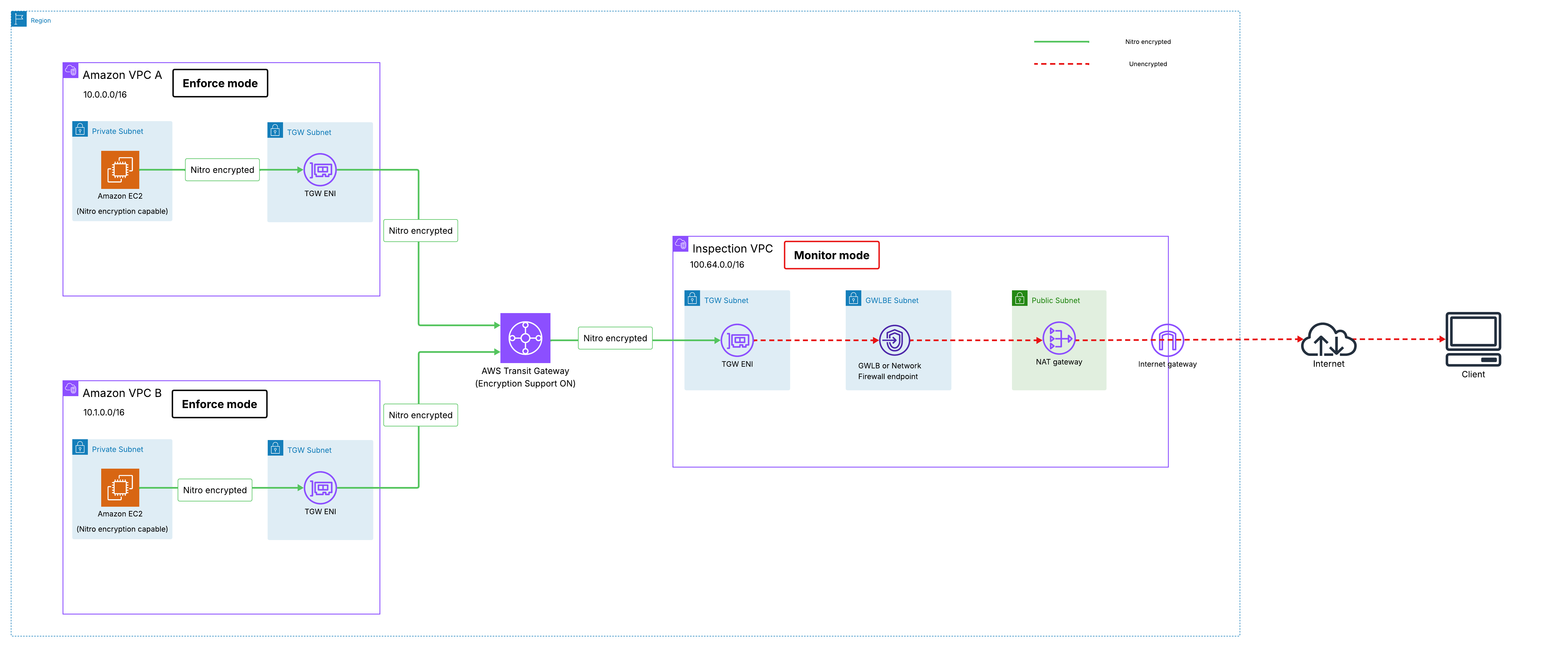
Figure 3: Transit Gateway with centralized inspection and egress, spoke VPCs in enforce mode, inspection VPC in monitor mode
Pattern 4: Consume AWS service endpoints over AWS PrivateLink
VPC Encryption Controls evaluates encryption posture for interface VPC endpoints (AWS PrivateLink), including cross-Region PrivateLink endpoints, at the application layer. AWS does not inspect packet contents to determine encryption status. Instead, it uses the destination port and the service’s TLS configuration to classify each flow, so the compliance depends on the PrivateLink endpoint, not on whether the source instance is Nitro-capable. In enforce mode, VPC Encryption Controls drops any flow that is not classified as application-encrypted. The classification follows three paths:
- Interface VPC Endpoints for AWS services exclusively using TLS on port 443: VPC Encryption Controls classifies port 443 traffic to interface endpoints as application-encrypted. Because the service exclusively accepts connections on port 443, every flow to this endpoint meets the encryption classification. In enforce mode, traffic sent on any other port would be classified as unencrypted and dropped.
- Interface VPC Endpoints for AWS services using TLS on non-443 ports with encryption confirmation: For services that have internally confirmed to VPC Encryption Controls that TLS is required in their service configuration, traffic is classified as application-encrypted regardless of port. Flows pass through without being dropped in enforce mode. Amazon Redshift on port 5439 is one example, though Redshift clusters are an exception that may still require you to manually migrate the underlying resources to encryption-capable hardware.
- VPC Endpoints on non-443 ports without encryption confirmation: A flow is classified as application-encrypted only when it is confirmed, either by arriving on the port-443 path that is treated as encrypted, or because the service has confirmed to VPC Encryption Controls that TLS is required in its configuration. When neither applies, flows are classified as unencrypted and dropped in enforce mode. This applies to PrivateLink for custom services or SaaS products through AWS Marketplace, where the determination is based on the service’s internal configuration (not something you control). You must delete these endpoints before moving the VPC to Enforce, independent of whether the provider encrypts. Resource endpoints and service network endpoints behave differently. Rather than requiring TLS confirmation, you can allow these endpoints under enforce mode by turning on the VPC Lattice exclusion.
Figure 4 shows VPC endpoint types and encryption classification in enforce mode.
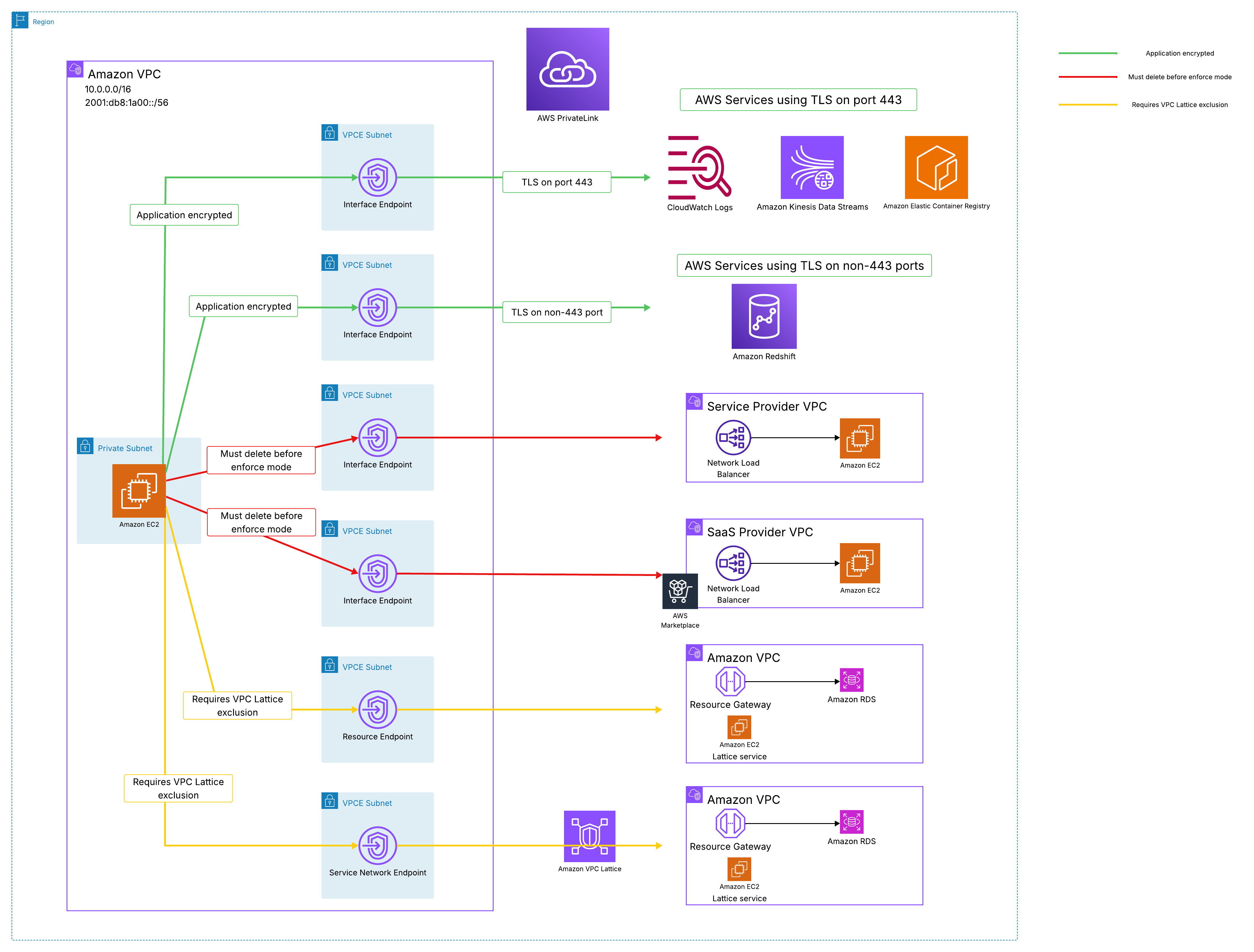
Figure 4: VPC endpoint types and encryption classification in enforce mode
Pattern 5: Access Amazon S3 and DynamoDB using Gateway VPC endpoints
Gateway VPC endpoints for Amazon S3 and Amazon DynamoDB enforce encryption at the application layer by limiting traffic to port 443. You do not need to make any changes to gateway endpoints to move your VPC to enforce mode. Once you turn on enforce mode, VPC Encryption Controls automatically blocks traffic not destined to port 443 through the gateway endpoint. It is worth noting that S3 as a service still accepts HTTP connections at the API level. However, the enforcement point is the gateway endpoint itself, not S3. In enforce mode, VPC Encryption Controls drops non-443 traffic before it reaches the gateway endpoint, regardless of what S3 would accept at its API layer. We recommend using monitor mode to verify that all your S3 and DynamoDB calls are using HTTPS before transitioning to enforce mode.
Figure 5 shows a VPC with gateway endpoints in the enforce mode.
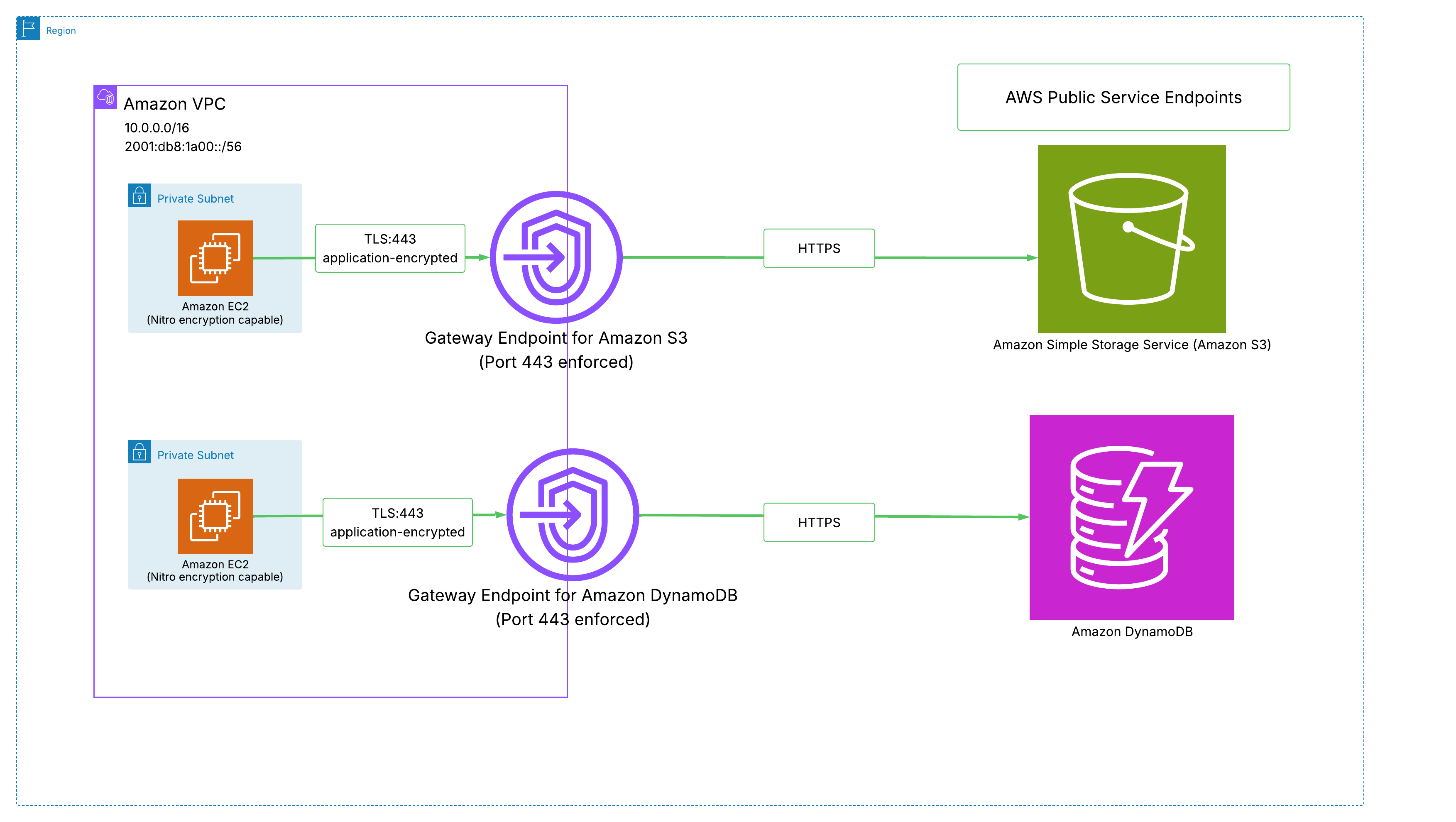
Figure 5: Gateway endpoints for Amazon S3 and DynamoDB with TLS 443 enforced
Pattern 6: Hybrid connectivity with Direct Connect and Site-to-Site VPN
Site-to-Site VPN terminating on Transit Gateway is the path that achieves end-to-end encryption and is required on the on-premises segment regardless of whether the underlay is the Internet or Direct Connect. You can establish Site-to-Site VPN to Transit Gateway over the Internet, Direct Connect public VIF, or Direct Connect transit VIF using private IPs (Private IP VPN). With Transit Gateway encryption support turned on, traffic between the Transit Gateway and VPC attachments in enforce mode traverses hardware-encrypted links in addition to IPsec encryption on the WAN segment between your on-premises network and AWS.
If your Site-to-Site VPN or Direct Connect terminates on a Virtual Private Gateway, you must add it as an exclusion in enforce mode. The Virtual Private Gateway exclusion acknowledges that encryption on the hybrid segment is your responsibility (IPsec for VPN, MACsec for Direct Connect). As of this writing, VPC Encryption Controls enforcement does not extend to traffic routed through AWS Cloud WAN core networks.
Figure 6 shows both supported hybrid connectivity paths: Site-to-Site VPN terminating on an encryption turned on Transit Gateway for end-to-end encryption, and Site-to-Site VPN terminating on a Virtual Private Gateway (VGW) with a VGW exclusion.
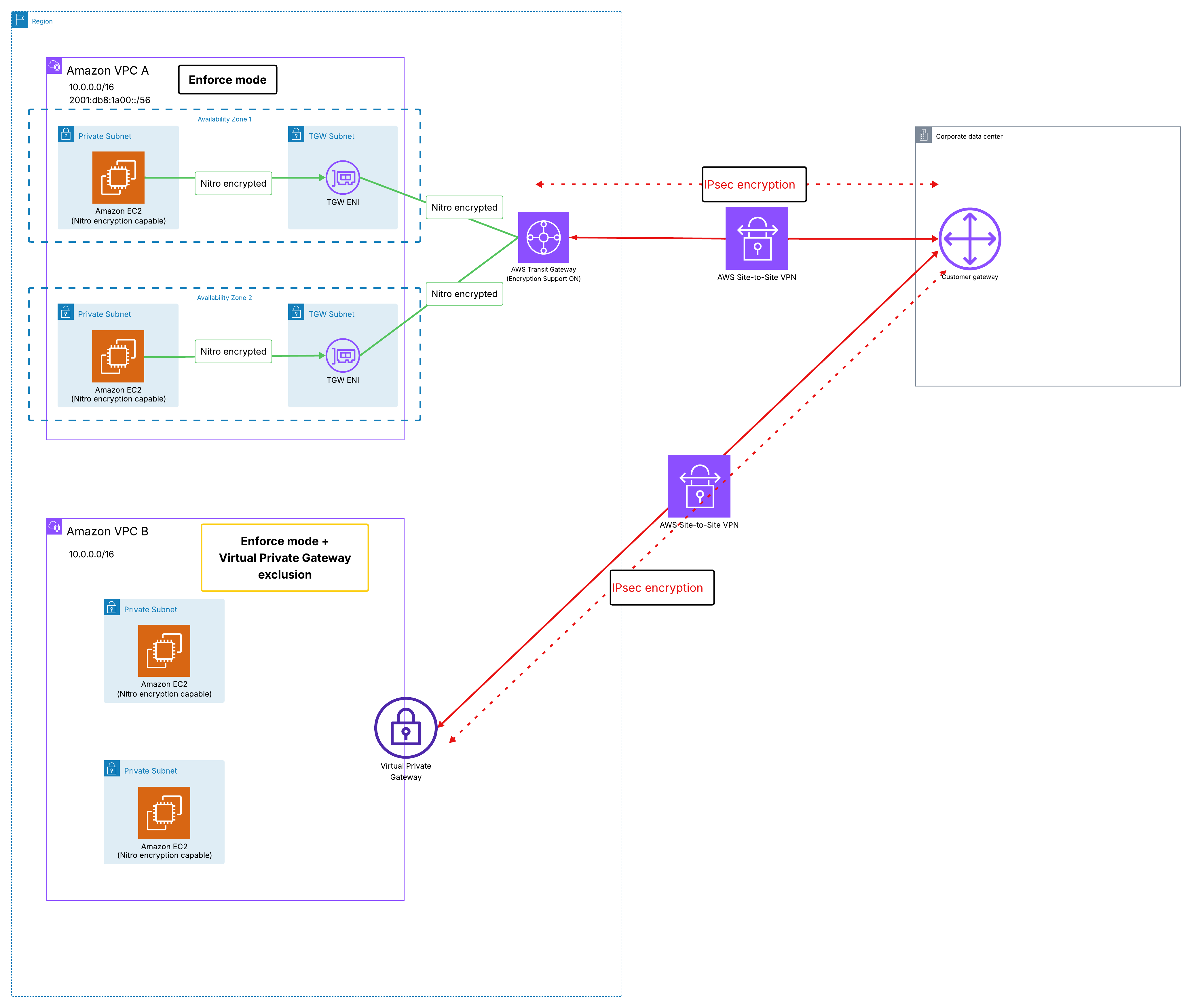
Figure 6: Site-to-Site VPN terminating on encryption turned on Transit Gateway and Virtual Private Gateway with exclusion
In this post, we covered the network encryption layers AWS provides across your network and showed how VPC Encryption Controls builds on them to provide centralized visibility and enforcement within and across VPCs. For organizations managing multiple accounts, declarative policies let you apply and maintain these enforcement settings centrally across your entire organization or specific OUs. We discussed common connectivity patterns and how VPC Encryption Controls applies to each, identifying encryption boundaries, interoperability constraints, and recommended configurations. This lets you verify encryption posture across your environment, prevent non-compliant resources from being introduced, and demonstrate continuous encryption enforcement to meet regulatory requirements. Get started by turning on monitor mode in the Amazon VPC console. Stay tuned to VPC Encryption Controls documentation as we are continuously expanding native encryption support to additional AWS services.
About the authors

Rohit Aswani
Rohit is a Principal Networking Specialist Solutions Architect in the Worldwide Public Sector organization at AWS, where he helps customers build and design scalable, highly-available, secure, resilient and cost effective networks. He helps customers and partners adopt and accelerate IPv6 deployment to meet federal government mandates. He holds a MS in Telecommunication Systems Management from Northeastern University, specializing in Computer Networking. Outside of work, Rohit enjoys hiking, traveling and exploring new coffee places.

Akshay Choudhry
Akshay is a Principal Product Manager in the Networking and Security Services Team at Amazon Web Services. He is focused on making Virtual Private Clouds more intuitive and secure for the millions of customers running their workloads on AWS. In his free time, he enjoys exploring the outdoors, trying out new restaurants, and spending time with friends and family.