When and how to centralize AWS PrivateLink Interface endpoints with Amazon VPC Lattice
In large multi-account AWS environments, teams need to centralize AWS PrivateLink interface endpoints for services by often provisioning the same endpoints separately in each Amazon Virtual Private Cloud (Amazon VPC). As the number of VPC and accounts grow, this leads to added endpoint costs, inconsistent endpoint policies and operational overhead. With centralized endpoints, you provision each endpoint once in a shared services VPC and give every consumer VPC private access to that shared set. This removes the duplicated hourly charges and per-VPC configuration.
There are two established patterns for delivering that centralized access: a routing hub built on AWS Transit Gateway or AWS Cloud WAN, and a resource-access model built on Amazon VPC Lattice. In this post, you first work through how to choose between them based on your requirements. The routing hub pattern is already documented in this blog, so this post focuses on the VPC Lattice pattern. We walkthrough the key decisions and deployment steps for centralizing endpoints in a single Region using custom domain names for resources. This allows consumer VPCs to keep resolving the standard AWS service names with no manual DNS record management. For the underlying VPC Lattice concepts and traffic flows, refer to Streamline and secure access to shared services and resources with Amazon VPC Lattice.
The starting state is the same in both cases: each consumer VPC runs its own set of interface VPC endpoints, each incurring hourly and data processing charges, with security groups and endpoint policies managed independently per account. Figure 1 shows this starting state, with each consumer VPC running its own set of interface endpoints for services such as Amazon Kinesis Data Streams, Amazon Elastic Container Registry (Amazon ECR), AWS Secrets Manager and Amazon CloudWatch Logs.
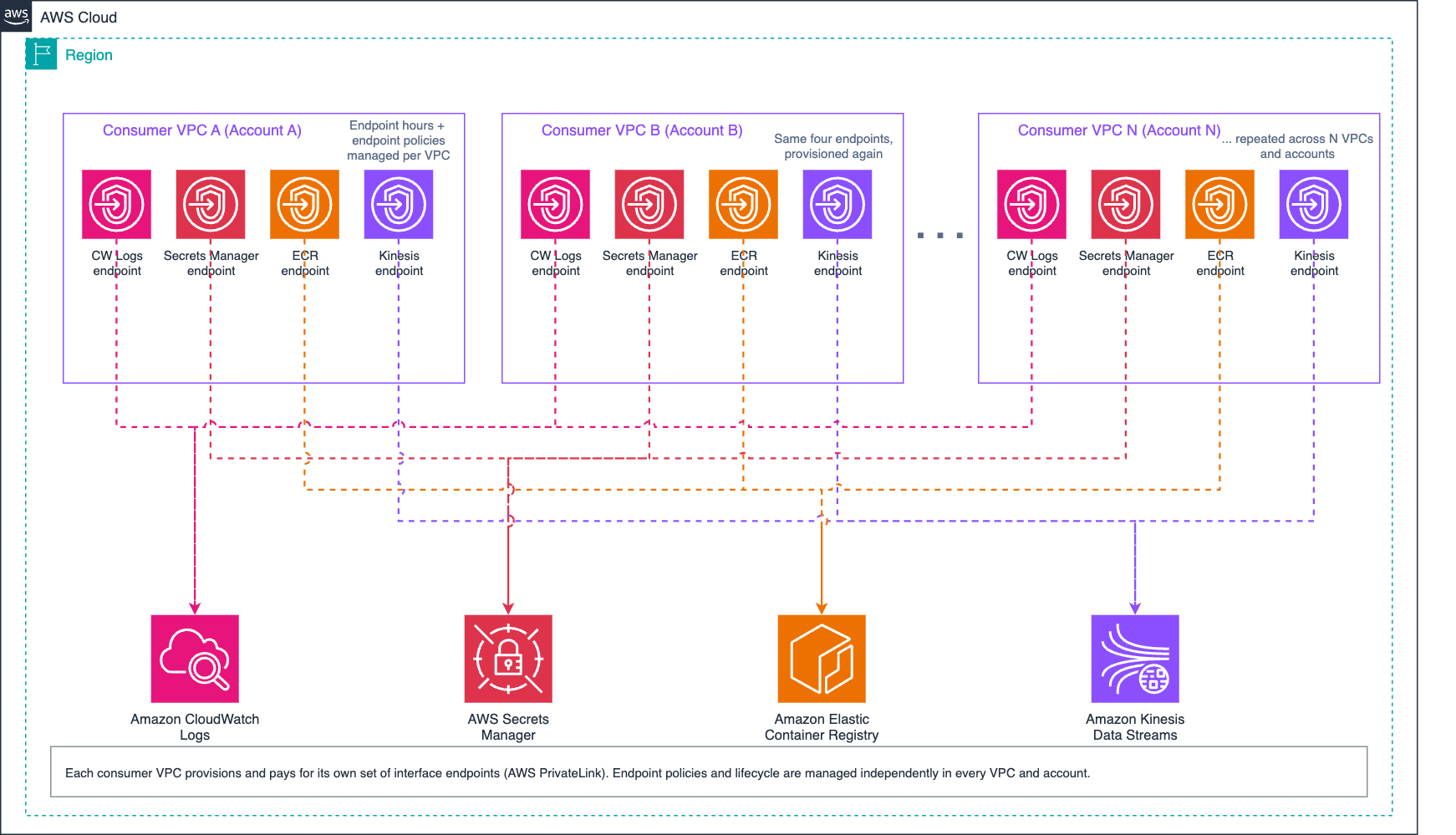
Figure 1: Starting state with per-VPC interface endpoints
Pattern 1: Routing hub pattern (Transit Gateway or Cloud WAN): Consumer VPCs attach to a Transit Gateway or Cloud WAN core network with routes toward the shared services VPC. DNS is handled with an Amazon Route 53 private hosted zone (PHZ) per centralized service domain, associated with every consumer VPC (or distributed through Amazon Route 53 Profiles), resolving the service name to the shared endpoint’s IP addresses. This pattern provides broad Layer 3 reachability: consumers reach the endpoints, and anything else routing permits. Figure 2 illustrates this pattern with a Transit Gateway hub connecting consumer VPCs to a shared services VPC.
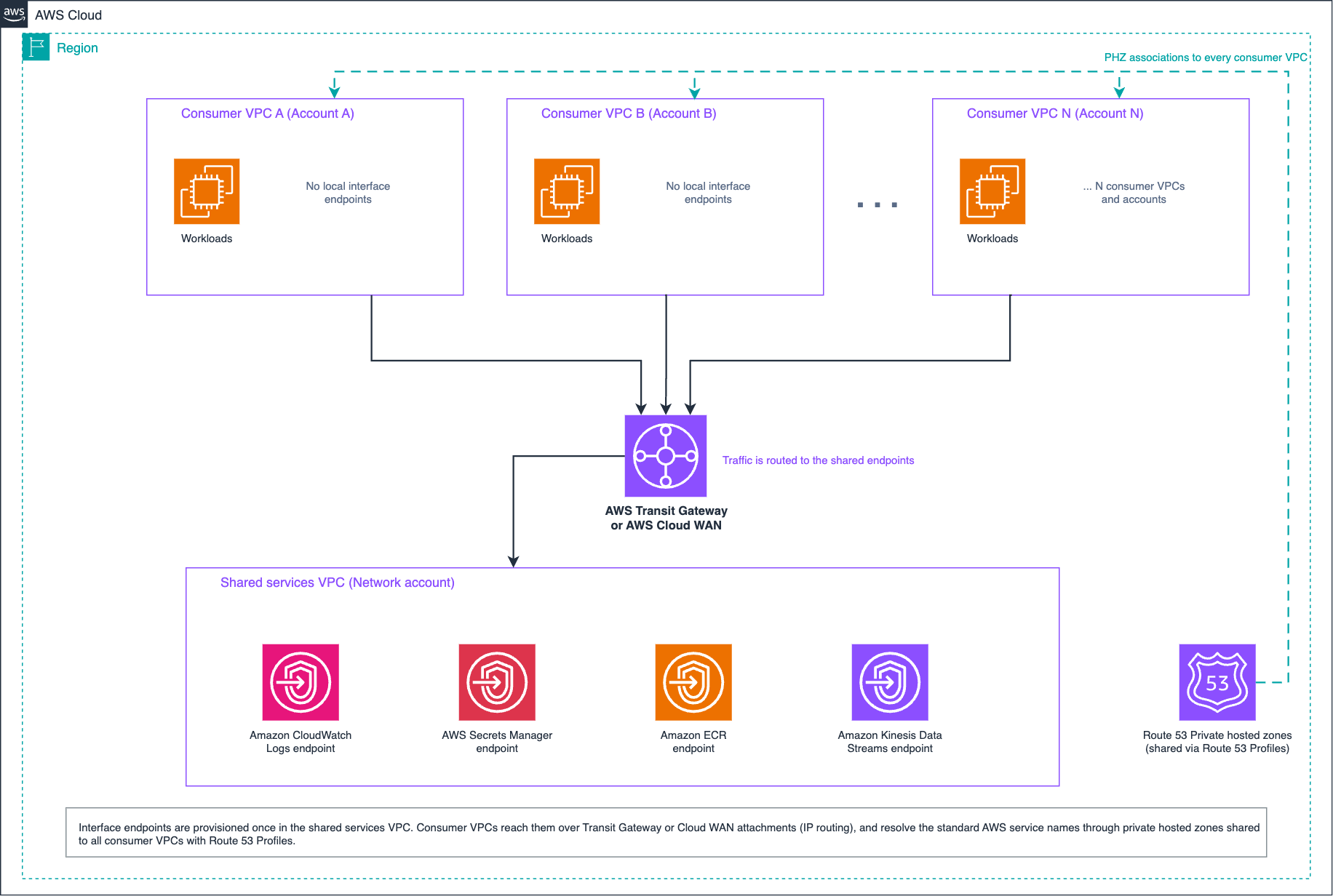
Figure 2: Centralized endpoints through a routing hub
Pattern 2: VPC Lattice pattern (resource-access model): Consumer VPCs associate with a VPC Lattice service network. Each centralized endpoint is exposed as a resource configuration behind a resource gateway in the shared services VPC, and VPC Lattice creates and manages the PHZs in consumer VPCs on your behalf. Consumers reach exactly the resources associated with the service network, and nothing else. Figure 3 shows the VPC Lattice pattern with consumer VPCs accessing centralized interface endpoint for Secrets Manager through a service network.
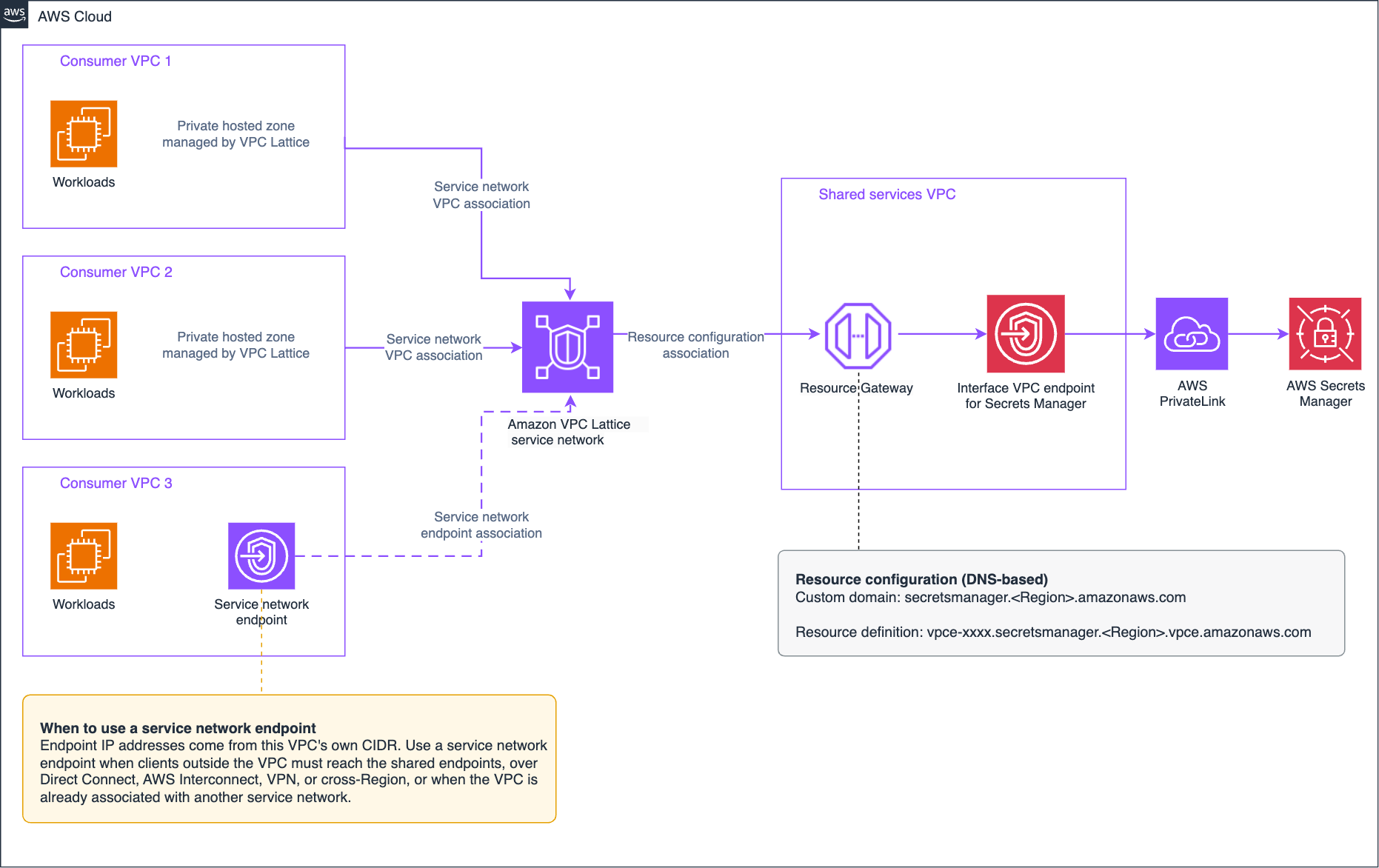
Figure 3: Centralized AWS PrivateLink interface endpoints with an Amazon VPC Lattice service network
Each pattern serves different requirements. Use the following to decide:
Overlapping IP addresses: The routing hub pattern requires non-overlapping CIDRs across every attached VPC, since consumers reach the shared endpoints over standard IP routing. Every consumer VPC needs a unique address range, a route toward the shared services VPC, and route management at the hub as the environment grows.
The VPC Lattice pattern removes that routing requirement entirely. Consumer VPCs access shared services by connecting to the service network through a service network association (SNA) or service network endpoint (SNE). With a service network VPC association, consumers resolve the custom domain to VPC Lattice-managed non-routable addresses (129.224.0.0/17 for IPv4 and fd00:ec2:80::/64 for IPv6). Because these addresses do not belong to any VPC CIDR, consumer VPCs need no unique addressing and no CIDR planning. A service network endpoint works differently. It takes its IP addresses from the consumer VPC’s own CIDR, making it routable from on-premises, but those addresses only need to be free within that consumer’s VPC, not unique across your environment. Under either model, consumer VPCs can overlap with each other and with the shared services VPC. If your environment has overlapping CIDRs, the VPC Lattice pattern is the better choice because it eliminates the routing constraints entirely.
Reachability scope and security model: With the routing hub pattern, endpoint access rides on general network reachability. The consumer VPC has a full bidirectional routable path to the shared services VPC, and you scope what it reaches using routing design, endpoint policies, security groups on both the endpoints and source resources, and other network controls such as firewalls. Consumer VPCs potentially reach other resources in the shared services VPC unless you explicitly prevent it.
With the VPC Lattice pattern, consumer VPCs get access to shared resources only. A consumer VPC reaches exactly the endpoints the service network owner has shared, such as the Kinesis and ECR endpoints, and nothing else. There is no route into the shared services VPC, so there is no network path to lock down. This access is unidirectional, similar to AWS PrivateLink itself, in contrast to the fully layer-3 routable path that the Transit Gateway option provides. Anything you have not shared is not reachable from the consumer’s point of view. Security groups still apply at the service network VPC or endpoint association, the resource gateway and the VPC endpoint. Endpoint policies also remain in effect on the interface endpoint, so you keep the same identity-based access controls regardless of which pattern delivers the traffic.
Cost shape: The two patterns scale cost along different dimensions. Your VPC count and traffic volume determine which fits better. Both patterns share the same interface endpoint costs: an hourly charge per endpoint plus per-GB data processing at the endpoint itself. The difference is in how consumer VPCs reach them.
The routing hub pattern charges per VPC attachment per hour plus a per-GB data processing rate. Cost grows with both consumer count and traffic volume, and the attachment charges accrue even when traffic is light. Sharing the private hosted zones across consumer VPCs with Route 53 Profiles adds an hourly charge of its own (direct PHZ associations carry no additional cost). If you already run the hub for general connectivity and Profiles for DNS management, the only additional cost is the incremental data processing. This pattern’s incremental cost is highest when you are setting it up solely for endpoint centralization.
The VPC Lattice pattern has no per-consumer VPC association charge, since VPC associations and service network endpoints are available at no additional cost. VPC Lattice creates and manages the private hosted zones for you. Cost tracks what you share rather than who consumes it: an hourly charge for each resource configuration, plus per-GB data processing. For a large number of endpoints with low traffic volume, the VPC Lattice pattern saves on hourly attachment costs since VPC associations carry no per-consumer charge. For a small number of endpoints with high traffic volume, compare the per-GB data processing rates between the two patterns, as the difference compounds at scale. If your endpoint traffic is light and you already run the hub for general connectivity, reusing it remains a valid approach. The VPC Lattice pattern is most cost-effective for data-heavy endpoint traffic or when a routing hub exists solely to provide access from many VPCs to centralized VPC endpoints. Model against your traffic profile and attachments using the
Operational model: Both patterns need an owner; they differ in what that owner does day to day. The routing hub pattern uses constructs many networking teams already operate: route tables, attachments, PHZ associations, and security groups. The tradeoff is that the DNS and routing work may recur with every VPC you add. The VPC Lattice pattern inverts this. It removes route and DNS record management entirely, since VPC Lattice manages the PHZs for you, but it introduces new constructs to own: the resource gateway, resource configurations, and custom domain names that are immutable after creation.
A note on performance: latency does not separate the two patterns. Both deliver traffic over the AWS network with minimal added latency. Using an additional L7 firewall with the routing hub pattern adds latency and cost. If you have latency-sensitive workloads, evaluate the performance of any centralization approach in your environment to confirm it meets your requirements.
You do not have to choose one pattern for everything. For example, keep the routing hub for general connectivity, for endpoints that on-premises clients reach over AWS Direct Connect or AWS Site-to-Site VPN, or where you need broader Layer 3 reachability into the shared services VPC. Use the VPC Lattice pattern for data-heavy endpoints at the lower data processing rate, or for endpoints consumed by VPCs with overlapping address space. DNS precedence determines which pattern is active for each service.
The routing hub pattern is already documented in Streamlining multi-VPC DNS management with Amazon Route 53 Profiles and interface VPC endpoint integration. The rest of this walkthrough focuses on the VPC Lattice pattern. A shared services VPC hosts a single set of interface endpoints for the AWS services you want to centralize. With custom domain names for resources, VPC Lattice creates and manages a PHZ in each consumer VPC, so clients resolve the standard AWS service domain and reach the shared endpoint. TLS is terminated by the interface endpoint, not by VPC Lattice, so applications keep end-to-end encryption with the AWS service. The walkthrough centralizes one service, AWS Secrets Manager, to keep the steps concrete. Repeat the resource configuration step for each additional service.
You need a shared services VPC with private subnets in at least two Availability Zones (AZs), one or more consumer VPCs in the same Region with the enableDnsSupport and enableDnsHostnames attributes set to true, IAM permissions for VPC endpoints and VPC Lattice resources, and a test client in a consumer VPC. This post assumes working familiarity with VPC Lattice resource gateways, resource configurations, and service networks.
The following steps summarize the build. For complete deployment, including CloudFormation and Terraform implementations, see the centralized VPC endpoints pattern in the Amazon VPC Lattice Blueprints repository.
1. Create the interface endpoint in the shared services VPC, across at least two AZs, with a security group allowing inbound TCP 443 from the resource gateway (create the resource gateway’s security group first, or update the rule after step 2) as shown in Figure 4.
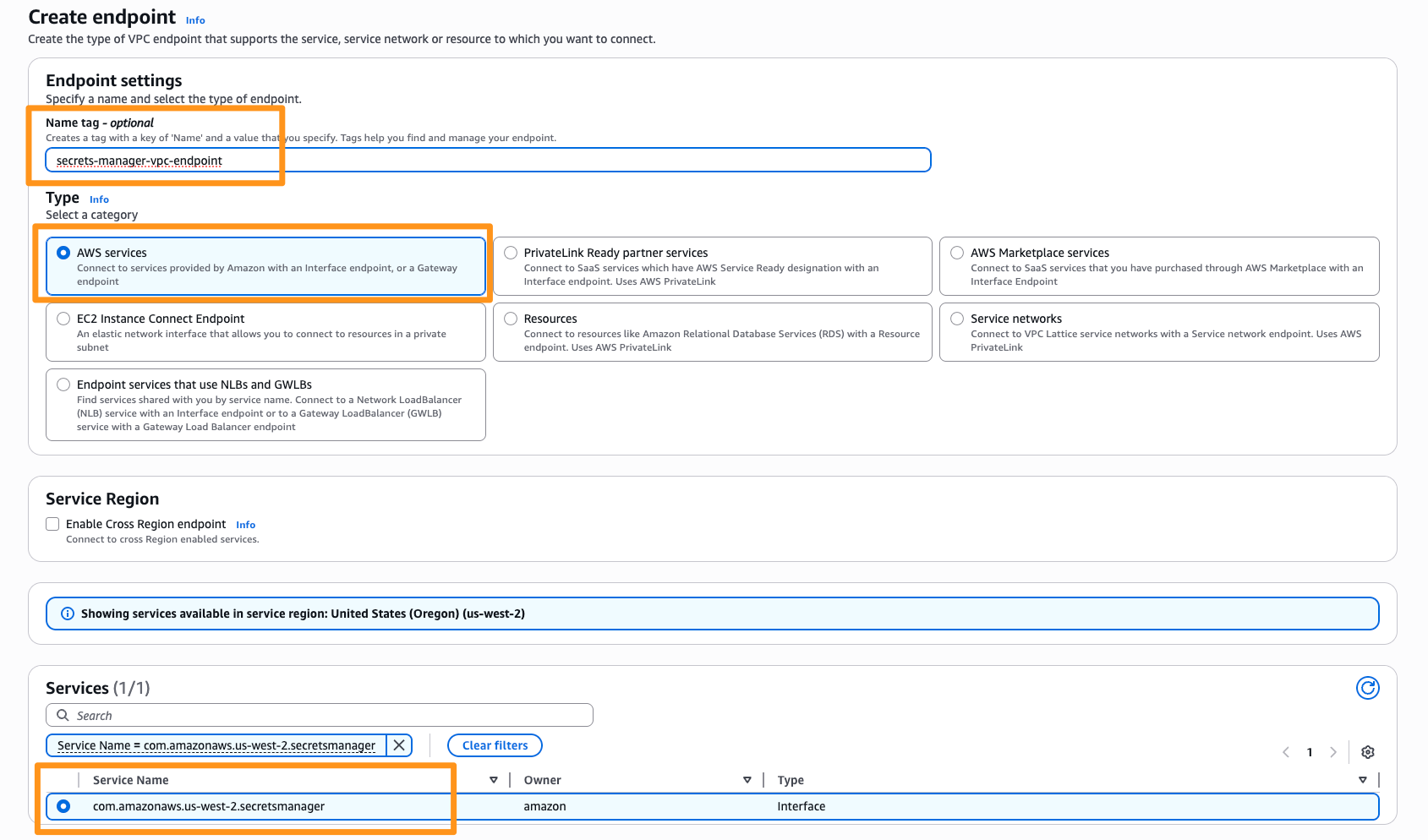
Figure 4: Interface endpoint for Secrets Manager in the Shared Services VPC
2. Create the resource gateway in private subnets across at least two AZs. Set the IP address type to Dualstack, and attach a security group allowing outbound TCP 443 to the endpoint’s security group (Figure 5).
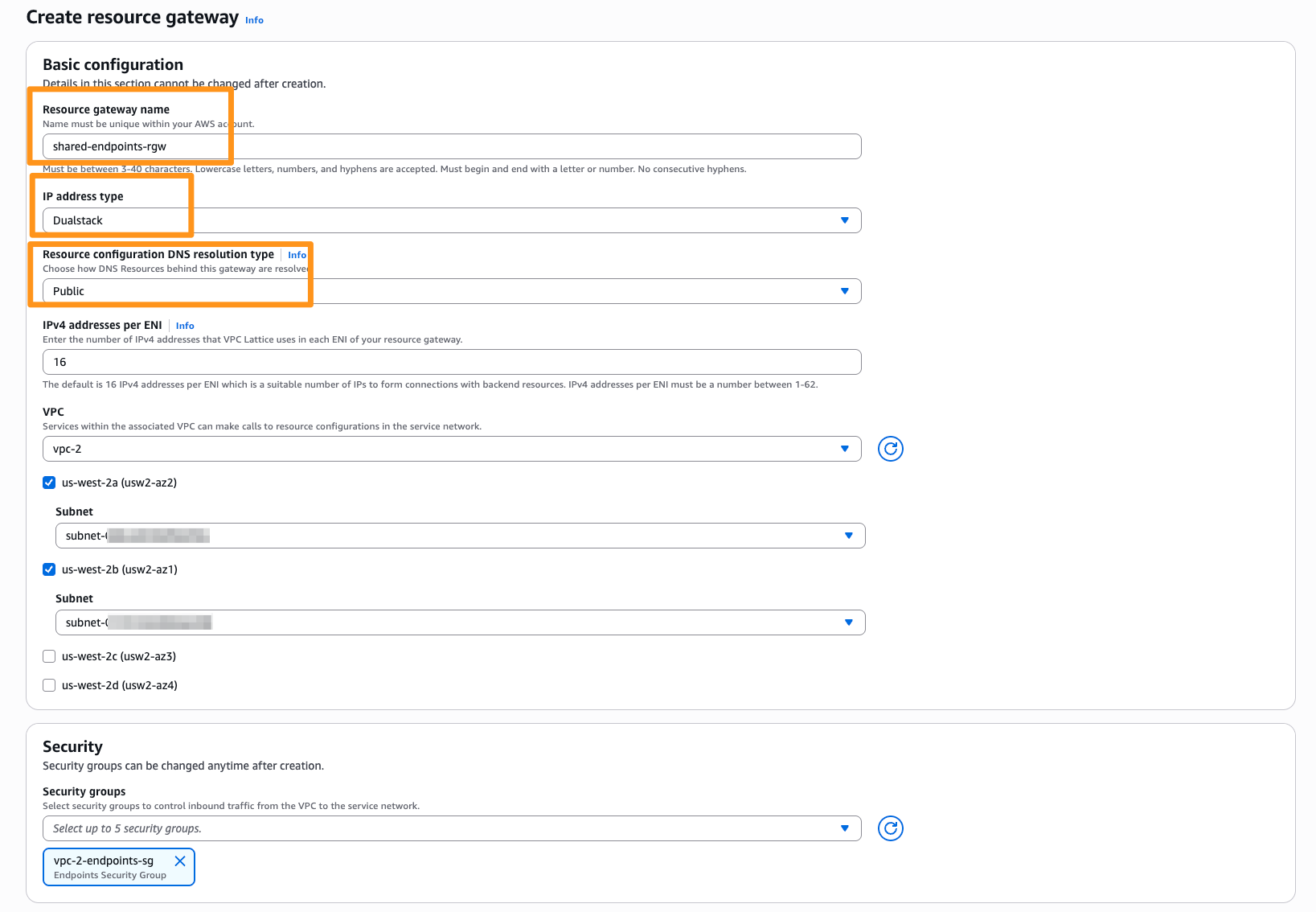
Figure 5: Resource gateway in the Shared Services VPC with Public DNS resolution type selected
3. Create the resource configuration as a DNS-based single resource configuration on the resource gateway. The resource definition targets the endpoint’s Regional VPC endpoint DNS name (vpce-), the custom domain name is the service domain secretsmanager., protocol TCP, port 443. The custom domain name and verification ID are fixed at creation, so plan one configuration per service domain before you begin.
Figure 6 shows the resource configuration settings.
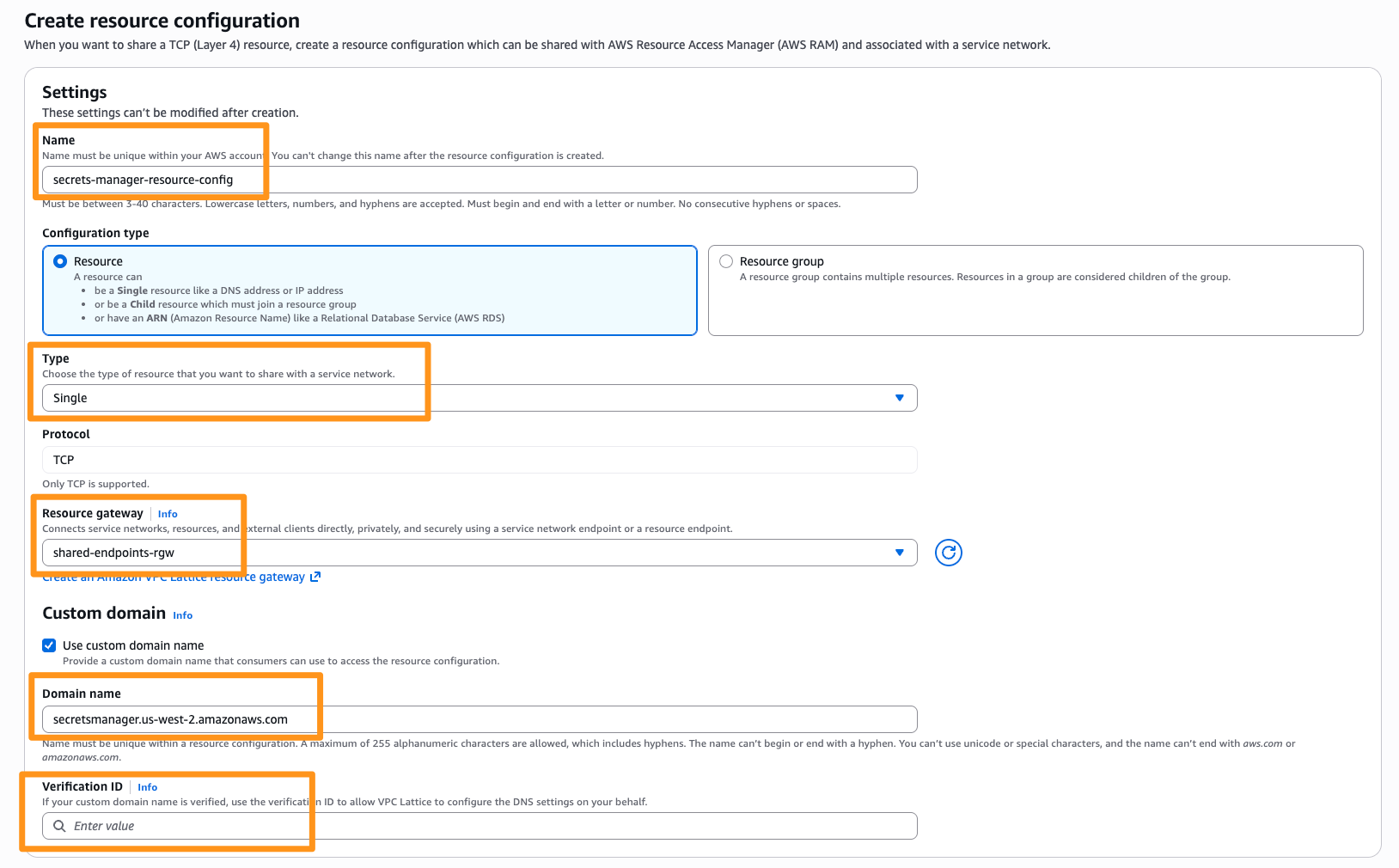
Figure 6: Resource configuration mapping the custom domain name for AWS Secrets Manager
Figure 7 shows the resource definition pointing to the VPC endpoint’s regional DNS name.
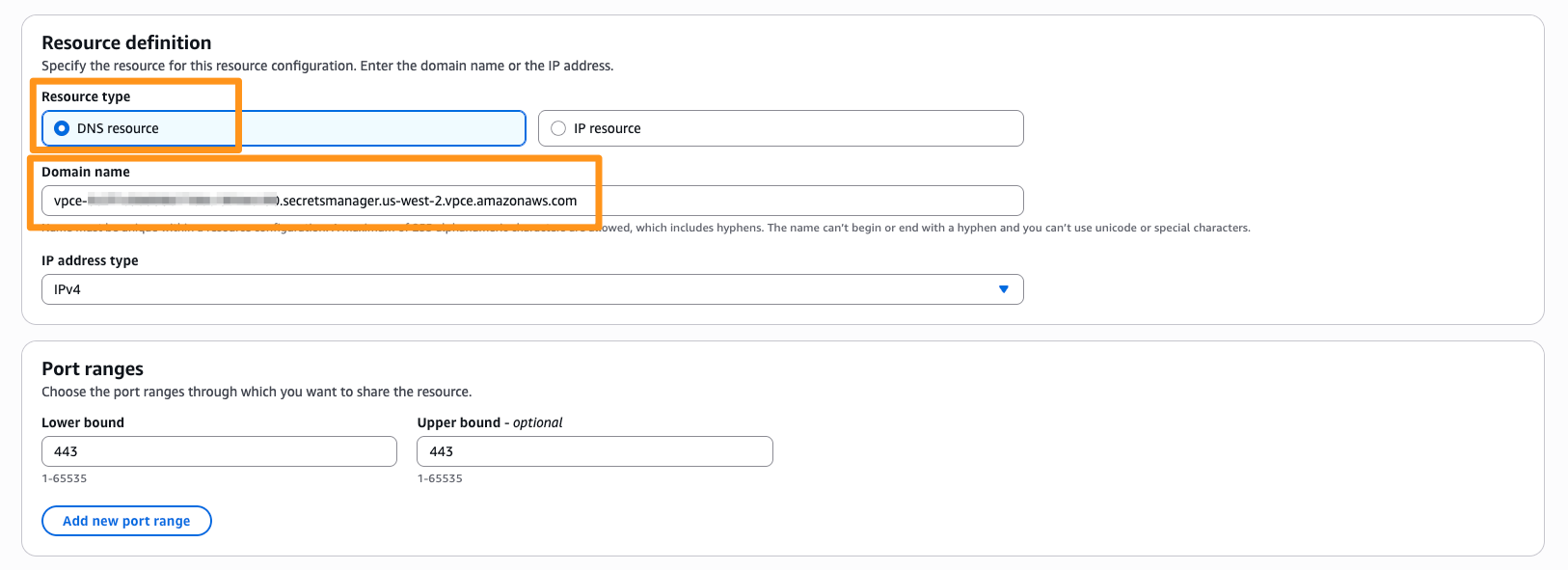
Figure 7: DNS resource definition
4. Create the service network and add the resource configurations with Private DNS names turned on for that resource association (Figure 8). If it is disabled here, VPC Lattice creates no hosted zones in any connected VPC, regardless of the consumer-side settings.
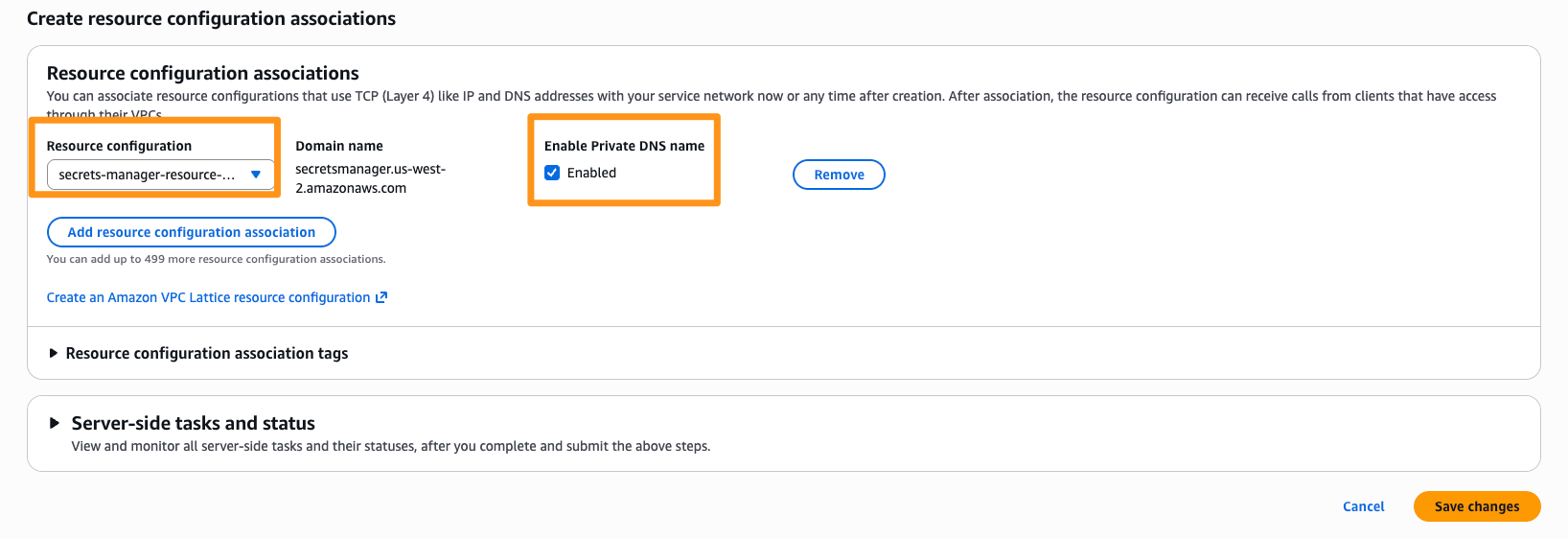
Figure 8: Service network with the Secrets Manager resource configuration associated and Private DNS names enabled
5. Associate the consumer VPCs with one service network VPC association per consumer VPC, with DNS names turned on for the association and Private DNS preferences set to All domains. Three settings must all permit the domain for custom domain names to work: Private DNS names on the resource association, DNS names on the VPC association, and the consumer’s Private DNS preferences. Figure 9 shows the consumer VPC association with Private DNS preferences.
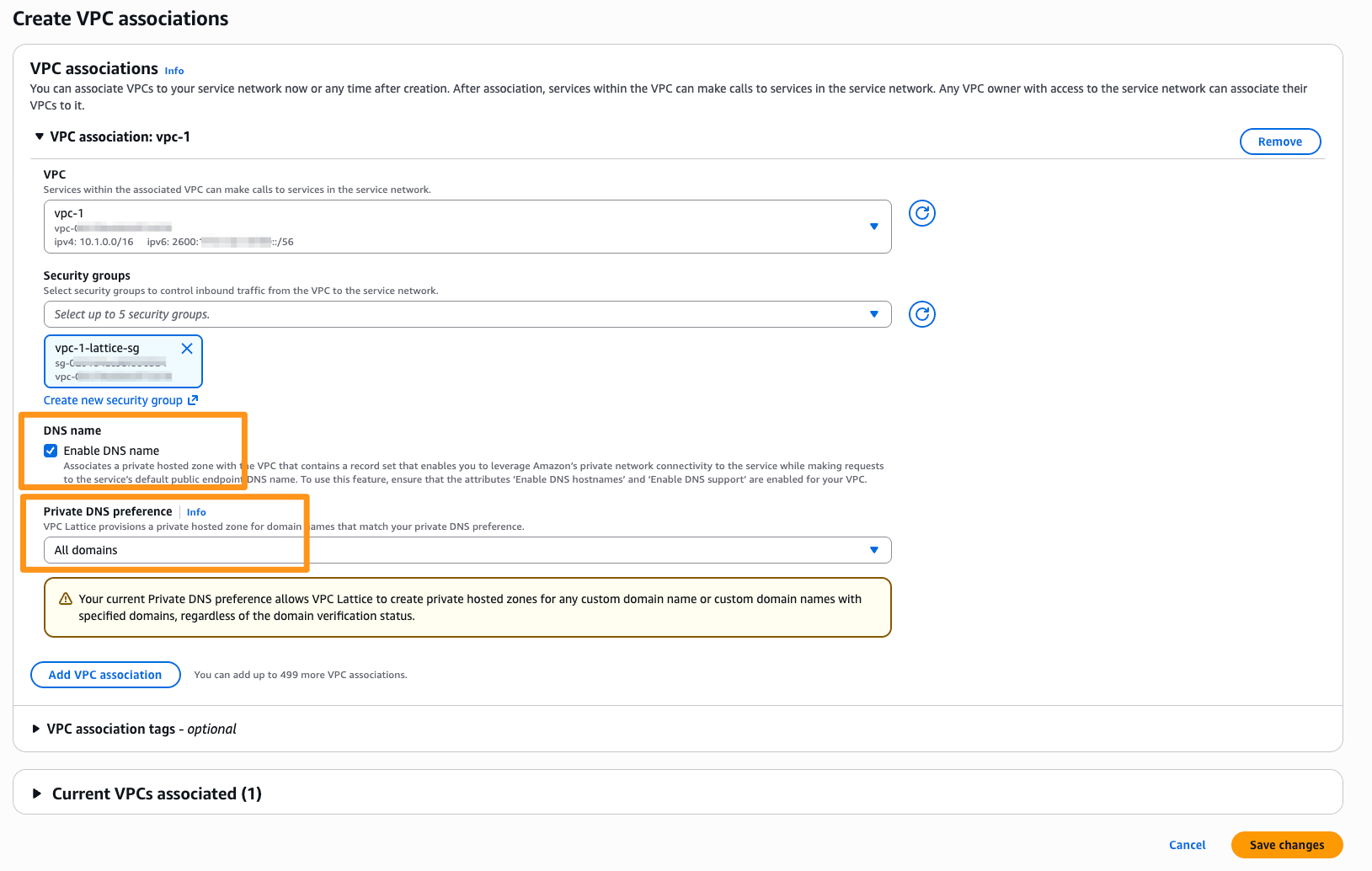
Figure 9: Consumer VPC association with Private DNS preferences set to All domains
6. Validate the end-to-end flow from a test client in a consumer VPC.
Verify DNS resolution first:
dig secretsmanager..amazonaws.com +short
129.224.x.x
An address in 129.224.0.0/17 confirms the Lattice-managed hosted zone is active; a public IP means the Private DNS preferences are not permitting the unverified domain. After this, you can, confirm API connectivity:
aws secretsmanager list-secrets --region A successful response confirms the full path: client, Lattice-managed hosted zone, service network, resource gateway, interface endpoint, service. If DNS resolves but the call times out, check security groups between the resource gateway and the endpoint. To avoid ongoing charges when you are done, remove the resources in reverse order of creation; the blueprints repository includes teardown steps.
Moving to this pattern is a DNS migration rather than a network migration. Steps 1 through 4 are all provider side, so you build the whole thing while each consumer VPC keeps resolving and reaching the endpoints it uses today. The only build difference is at step 5. For consumer associations, note that a VPC can be associated with only one service network. If a consumer VPC already uses one, you add your resource configurations to that service network rather than creating a second, or connect that VPC through a service network endpoint instead. No traffic routes through the VPC Lattice service network until a client resolves a service name and receives a VPC Lattice-managed address instead of the current endpoint address. That makes resolution order the key consideration to plan for. A VPC resolves each name against the most specific hosted zone attached to it, whether that zone comes from a Route 53 Profile, a direct association, a local interface endpoint’s private DNS, or VPC Lattice. Your existing zones keep answering until you remove them, so you can migrate one VPC at a time and roll back when necessary.
VPC Lattice associates its managed hosted zones to a VPC only when the consumer association is created. If a zone for the same domain name is already attached to that VPC, VPC Lattice skips that domain. Removing the older zone later does not bring the VPC Lattice zone into play. You must delete the association and create it again. The behavior depends on the custom domain you chose in step 3. A group domain such as
Individual per-service domains carry the same name as the zone already in that VPC. VPC Lattice skips associating its managed zone when a zone for that domain already exists, so you must remove the existing zone before creating the Lattice consumer association. For each VPC: remove the existing zone, create the Lattice consumer association, then verify resolution. Schedule this as a change window, because the service name resolves publicly in the gap.
Start with the service domains that carry the most data-processing traffic or those in VPCs with overlapping address space. Remember that adding a resource configuration reaches all associated VPCs at once. Test the sequence in one VPC before planning a large rollout. You do not need to migrate every endpoint to one pattern. Many environments run both the routing hub and VPC Lattice patterns permanently, using each where it fits best.
- One resource gateway, sized for connection volume: Multiple resource configurations can attach to the same resource gateway. Be mindful of the number of IPv4 addresses for each resource gateway’s ENI as that determines the maximum concurrent IPv4 connections to a resource. This doesn’t apply for IPv6.
- Resource configuration groups and DNS scope: A group is billed as a single resource configuration however many resources it holds, and carries one hourly charge instead of one per service. The saving grows with every service you add, and you also reduce operational overhead by managing one group instead of separate resource configurations. Each group carries one custom domain, and it has to be a parent of the names it covers. That domain decides how much of the AWS namespace VPC Lattice resolves in your consumer VPCs. Both ends of that range are valid designs. For a narrow scope, group the several endpoints of one service: Amazon ECR uses both
ecr.and.amazonaws.com dkr.ecr., so a group on.amazonaws.com ecr.covers both for one charge and nothing resolves outside ECR. For a Region-wide scope,.amazonaws.com .amazonaws.com - Endpoint domain variants: A resource configuration carries one custom domain, and the dual-stack endpoint names AWS publishes under
. .api.aws . .amazonaws.com - High availability: Keep the interface endpoint and resource gateway in at least two AZs and AZ-aligned. When using Service network endpoints (SNE), align at least one resource gateway AZ with an SNE AZ.
- IPv6: Each connection traverses two paths independently: the consumer to VPC Lattice, and the resource gateway to the interface endpoint. Each path can use a different IP address type (IPv4 or IPv6), because VPC Lattice translates between address families.
- Monitoring: Enable VPC Lattice access logs for per-request metadata. Service network logging captures access from all connected VPCs, and resource configuration traffic is published separately as
VpcLatticeResourceAccessLogs.
In this post, we walked you through choosing between the routing hub pattern and the VPC Lattice pattern for centralizing your PrivateLink endpoints. We then walked through the key decisions and deployment steps for the VPC Lattice pattern: a single shared set of interface endpoints that consumer VPCs reach by their standard AWS service names, with no per-VPC endpoints, no routing or CIDR planning, and no ongoing DNS record management. Your endpoint costs drop, security policies stay consistent across all consumers, and each endpoint’s lifecycle is managed in one place. You maintain your routing hub for general connectivity, centralize VPC endpoints with the VPC Lattice pattern where applicable, and let DNS precedence hold the seam, which is also what makes a gradual migration safe. Start with one service, validate the end-to-end flow, then add more resource configurations as needed. To get started, review the Amazon VPC Lattice documentation.
About the authors

Victor Babasanmi
Victor is a Senior Networking Specialist Solutions Architect at AWS. He focuses on providing customers with technical guidance on planning and building solutions using best practices, and proactively keeps their AWS environments operationally healthy. When he is not helping customers, you may find him playing soccer, working out, or looking for a new adventure somewhere.

Rohit Aswani
Rohit is a Principal Specialist Solutions Architect focused on Networking at AWS, where he helps customers build and design scalable, highly-available, secure, resilient and cost-effective networks. He holds a MS in Telecommunication Systems Management from Northeastern University, specializing in Computer Networking. Rohit is also a public speaker for AWS, and is helping government agencies and partners adopt IPv6. In his spare time, Rohit enjoys hiking, exploring new coffee places and traveling to new places.